 QRJiffy
How to Make a QR Code
You make a QR code in 4 steps: choose the QR code type, enter the content, style the code and download it as PNG or SVG. Creating the code is free; a free account saves it to your dashboard. The whole process takes under a minute in a browser on any device.
Updated · QRJiffy team
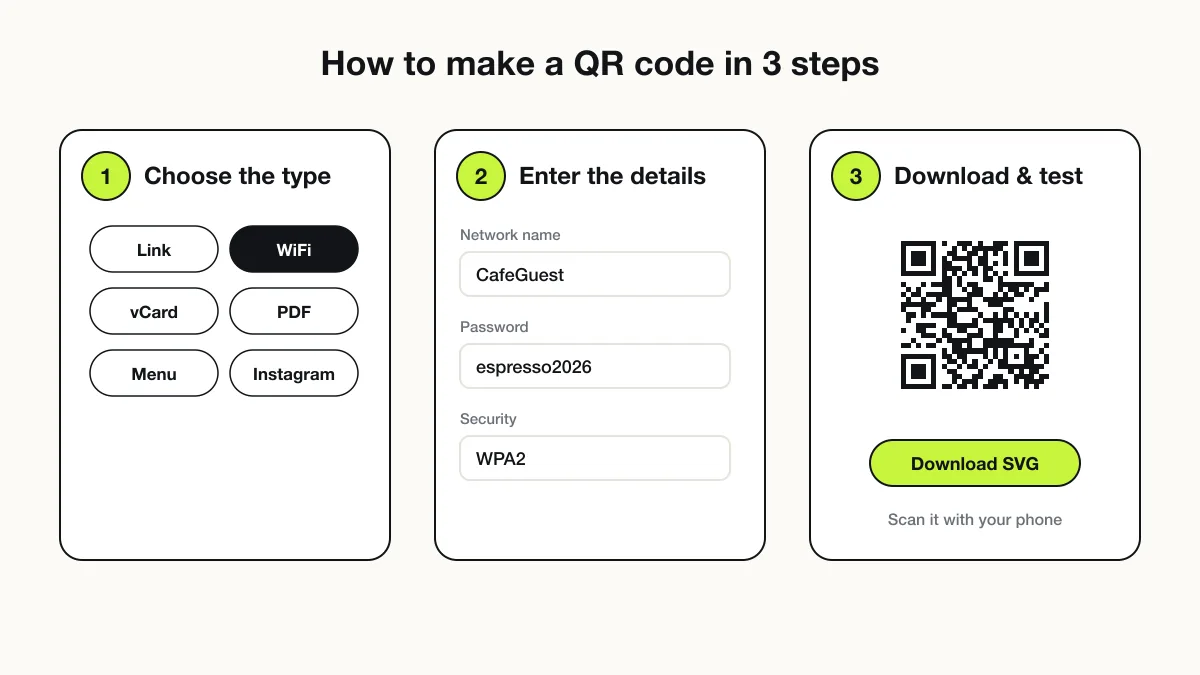
How do you make a QR code step by step?
Choose a type, enter the content, style the code, then download and test it. The four steps below apply to every QR code type.
- Choose the QR code type. The type decides what the phone does on scan: a link QR code opens a page, a WiFi QR code joins a network, a vCard QR code saves a contact.
- Enter the content. Type the link, the network name and password, or the contact details. The preview renders as you type.
- Style the code. Keep dark modules on a light background. Pick error correction M (15%) for indoor use and Q (25%) or H (30%) for outdoor or curved surfaces.
- Download and test. Download SVG for print and PNG for screens. Scan the downloaded file with two different phones before printing.
Which type of QR code should you make?
Choose the type by the action you want the scanner to take. The table maps common goals to the matching type.
| Goal | QR code type | What the phone does |
|---|---|---|
| Send people to a website | Link (URL) | Opens the page in the browser |
| Share WiFi with guests | WiFi | Joins the network without typing the password |
| Share contact details | vCard | Offers “Add to contacts” |
| Share a document | Opens the PDF for viewing or download | |
| Start a chat | WhatsApp, SMS, email | Opens the app with a pre-filled message |
| Collect reviews | Google review | Opens the review form for your business |
The types of QR codes page lists every type with its payload format.
How do you make a QR code on an iPhone?
Open a QR code generator in Safari, enter the content and save the downloaded image to Photos or Files. iOS has no built-in QR generator for links. Safari downloads land in the Files app under Downloads; long-press a PNG preview to save it to Photos instead.
iPhone users also share a link as a QR code from some apps: Shortcuts can run a “Generate QR code” action on any text. A generator gives more control over colour, size and file format.
How do you make a QR code on Android?
Use Chrome’s Share → QR code option for the current page, or a web generator for any other content. Chrome’s option encodes only the page URL. Android shares the saved WiFi network as a QR code from Settings → Network → WiFi → the gear icon → Share. The Google QR code generator guide covers both built-in options in detail.
How do you make a QR code on a computer?
Open a generator in any desktop browser, enter the content and download SVG for print work. A desktop is the best place for print files because design tools such as Canva, Word, InDesign and Illustrator import SVG directly. Downloads save to the Downloads folder on Windows and macOS.
How many scans does a free QR code get?
A free QRJiffy account gets 200 scans a month across all its codes, and Pro removes the limit for $30 a year. Pick Pro before printing menus, packaging or signs that many people will scan. Compare Free and Pro.
What mistakes stop a QR code from scanning?
Low contrast, a missing quiet zone, too small a print size and a broken destination are the 4 most common failures. Each one is avoidable before printing:
- Contrast: inverted (light-on-dark) codes fail on some older scanners. Keep dark modules on a light background.
- Quiet zone: leave at least 4 modules of blank margin on every side.
- Size: print at least 2 × 2 cm (0.8 in), and about one tenth of the scanning distance.
- Destination: a typo in the link produces a code that scans perfectly and opens a 404 page.
The QR code size guide gives a full size-by-distance table.
How do you test a QR code before printing?
Scan the exported file with at least 2 phones, from the real distance, at the real print size. Print one test copy on the final paper or material. Check that the destination loads on mobile data, not only on office WiFi. Glossy lamination causes glare, so test under the actual lighting.
Where can you make a QR code now?
The QRJiffy generator makes a QR code free, with no watermark, and saves it to your free account. Create a QR code now and download it as PNG or SVG.
Frequently asked questions
Can I make a QR code for free?
Yes, making a QR code costs nothing. QRJiffy generates codes free with no watermark; a free account saves them, and a free account gets 200 scans.
Can ChatGPT generate QR codes?
No, a chat model cannot reliably draw a scannable QR code from text alone. It can write code that calls a QR library, but a dedicated generator produces a valid, tested code in one step.
How do I make a QR code for a link?
Paste the full link into a link QR code generator and download the result. The code stores the URL, and any phone camera opens it in the browser.
How long does it take to make a QR code?
Making a QR code takes under a minute. Typing the content is the only real step; the code renders as you type.
Do I need an app to make a QR code?
No, a web-based generator works in any browser on a phone or computer. Phones also scan QR codes with the built-in camera, so neither side needs an app.
Sources
- Scan a QR code with your iPhone camera — Apple Support
- Connect to Wi-Fi networks on your Android device (share a network as a QR code) — Android Help
- What is a QR Code? — DENSO WAVE (QRcode.com)
- ISO/IEC 18004:2024 — QR Code bar code symbology specification — ISO