 QRJiffy
Social Media QR Code Generator
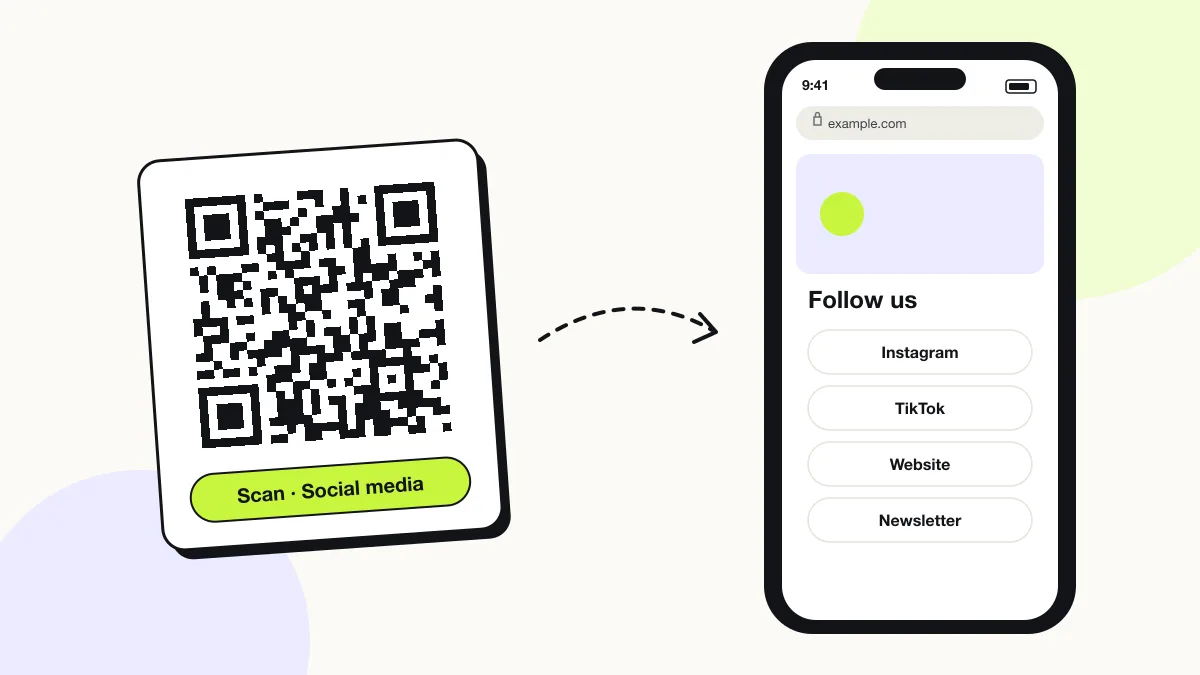
A social media QR code opens one page that lists every social profile of a person or brand, so each scanner follows you on the network they already use. One code replaces a row of handles on a flyer, menu or booth banner. Build a social links page on QRJiffy with a free account, or point the code at a profiles page you already run.
Just your email to download · no password needed
Short link:
Change where it points any time — the printed code stays the same. Free for 200 scans a month.
Encoded data
How to create a social media QR code
You create a social media QR code in 5 steps with the free generator above, and the code is ready to download as PNG or SVG.
- Collect your profile links on one page — a “follow us” page on your site or a link-in-bio page.
- Paste that page’s address into the profiles page field.
- Set a dark brand colour for the code and keep a white or light background.
- Download SVG for print or PNG for screens.
- Scan the downloaded file and tap every network button before printing.
What does a social media QR code contain?
A social media QR code stores profiles page URL, plus optional network buttons, headline and avatar, colours.
| Payload standard | Plain URL of a profiles page (UTF-8 text) |
|---|---|
| Native camera support | iPhone iOS 11+, Android 9+ (Google Lens / camera) |
| Needs internet to use | Yes — the profile loads in the app or browser |
| Change after printing | Yes — point the code at a new profile or page in your QRJiffy dashboard; the printed code stays the same |
| Scan tracking | Scans by day, device and country in your QRJiffy dashboard |
| Opens in | The platform’s app when installed, otherwise the browser |
| Recommended error correction | M (15%); H (30%) when a logo covers the centre |
| Minimum print size | 2 × 2 cm (0.8 in) for profile URLs under 40 characters |
| Field | Required | What it does | Example |
|---|---|---|---|
| Profiles page URL | Yes | The page that lists every network. The code opens this page. | https://example.com/follow-us |
| Network buttons | Optional | One button per network on the page, for example Instagram, TikTok, LinkedIn and YouTube. | instagram.com/yourbrand |
| Headline and avatar | Optional | A name and image at the top of the page that confirm whose profiles these are. | Northside Bakery |
| Colours | Optional | Foreground and background colour of the code; dark on light scans fastest. | #121417 on #FFFFFF |
Social media QR code payload format
https://<profiles-page-url>
https://example.com/follow-us
The code stores one link. The list of networks lives on the page behind that link, so the code stays sparse whether the page lists 2 profiles or 12.
Format reference: RFC 3986: URI generic syntax (IETF)

Can one QR code link to all social media profiles?
Yes, one QR code links to all your social media profiles by opening a single page that lists them. A QR code holds exactly one link, so the list of networks lives on that page, not inside the code.
Social media QR code vs single-network QR code: which converts better?
A single-network QR code converts better when one platform is the goal, because the scan opens the follow button directly. A social media QR code adds one tap but lets each scanner choose the network they already use.
| Attribute | Social media QR code | Single-network QR code |
|---|---|---|
| Opens | A page listing every profile | One profile in its app |
| Taps to follow | 2 (choose network, then follow) | 1 (follow) |
| Best for | Brands active on 3+ networks | A campaign for one platform |
| Change networks later | Edit the page | Switch the profile in your dashboard |
Can a social media QR code have a custom shape or logo?
Yes, a social media QR code keeps scanning with a centred logo when error correction is set to H (30%). The square finder patterns in three corners must stay visible and unchanged; circle frames work only as a border around the full square code.
What happens when someone scans a social media QR code?
The phone camera decodes a social media QR code in under a second and shows a prompt; tapping it starts the action stored in the code. The prompt differs by device:
iPhone
The Camera shows the page’s domain in a yellow banner; one tap opens the profiles page in Safari. Each network button then opens its app through universal links.
Android
Google Lens or the Camera opens the page in Chrome. Network buttons hand off to Instagram, TikTok or YouTube through Android app links.
Without the apps
Each button falls back to the network’s web profile, so scanners without the app still see your posts.
How many scans does a free social media QR code get?
A free account gets 200 scans a month across all its codes; Pro removes the limit for $30 a year. One scan is one phone opening the code. Each code uses a QRJiffy short link, so you can change where it points after printing and see scan counts. Compare Free and Pro.
Where to use social media QR codes
Social media QR codes work in 4 common places: shop counters, event booths, creator merch and restaurant tables.
Shop counters
In-store visitors follow you on the network they already open daily.
Event booths
One code on a banner replaces five handles nobody remembers.
Creator merch
Stickers, tees and packaging inserts grow every channel at once.
Restaurant tables
Table tents send diners to your Instagram, TikTok and Google profile from one scan.
Social media QR code best practices
A social media QR code scans first time when it follows these 5 rules.
- Put your strongest network first on the page; the first button gets the most taps.
- Keep the profiles page under 1 MB so it loads in under 2 seconds on 4G.
- Print a benefit-led call to action, for example “Scan for daily recipes”.
- Remove networks you have not posted on for 90 days.
- Use a single-network code instead when one platform drives over 70% of your followers.
Social media QR code FAQ
Do I need Linktree to make a social media QR code?
No. Build a social links page on QRJiffy with a free account, or use any page that lists your profiles, including your own website.
Does the code keep working if I add a new profile later?
Yes, as long as you update the page the code points to. The code stores the page address, not the list of networks.
Is a social media QR code free?
Yes. The social media QR code on this page is free and carries no watermark; a free account saves it so you can edit the links later.
How many profiles can one social media QR code hold?
There is no limit, because the profiles sit on the linked page rather than inside the code. Most brands list 3 to 6 networks.