 QRJiffy
SMS QR Code Generator
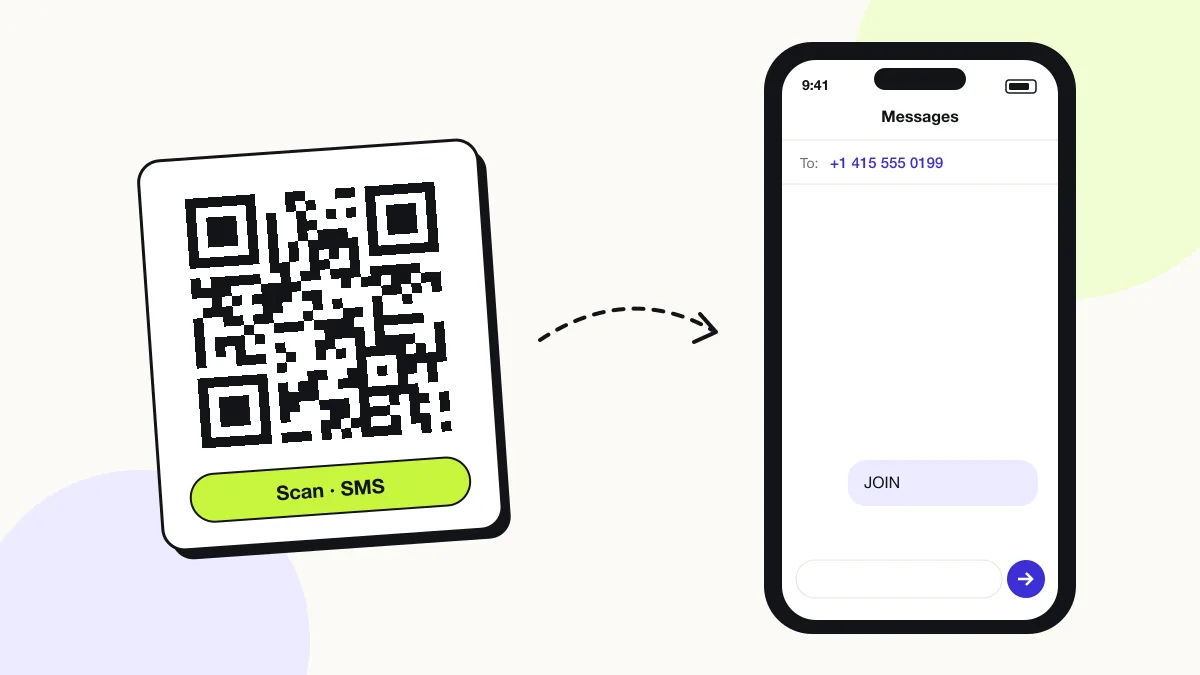
An SMS QR code sends a pre-written text message to a set phone number after one tap. It opens the scanner’s Messages app with the number and the text filled in. Businesses use it for keyword opt-ins, votes and quick replies.
Just your email to download · no password needed
Phones read this code directly, so it has no scan count.
Encoded data
How to create an SMS QR code
You create an SMS QR code in 4 steps with the free generator above, and the code is ready to download as PNG or SVG.
- Enter the phone number with + and the country code, or your short code.
- Type the message — a keyword your SMS system recognises.
- Scan the preview to check that Messages opens with both fields filled.
- Download the code and print the keyword next to it for people who type instead.
What does an SMS QR code contain?
An SMS QR code stores phone number, plus optional message.
| Payload standard | SMSTO: (ZXing) — readable as sms: URI |
|---|---|
| Native camera support | iPhone iOS 11+, Android 9+ |
| Needs internet to use | No — needs mobile signal to send the SMS |
| Editable after printing | No |
| Scan tracking | Not possible; count inbound keywords instead |
| Recommended error correction | M (15%) |
| Minimum print size | 2 × 2 cm (0.8 in) |
| Field | Required | What it does | Example |
|---|---|---|---|
| Phone number | Yes | The receiving number in international format, or a 5–6 digit short code. | +14155550199 |
| Message | Optional | The pre-filled text, often a keyword such as JOIN or VOTE A. | JOIN |
SMS QR code payload format
SMSTO:<number>:<message>
SMSTO:+14155550199:JOIN
SMSTO is the format iOS and Android cameras read most reliably. The alternative sms:+14155550199?body=JOIN URI works on iPhone but is inconsistent on older Android camera apps.
Format reference: RFC 5724: URI scheme for SMS (IETF)

Is an SMS QR code the same as a text QR code?
No, an SMS QR code opens the messaging app to send a text, while a text QR code only displays words on screen.
Use the text to QR code generator when nothing needs sending.
Does an SMS QR code send the message automatically?
No, the message is only drafted; the person reviews it and taps Send, so no message leaves the phone without consent.
Does an SMS QR code work with iMessage and WhatsApp?
Yes for iMessage, no for WhatsApp: iPhones send the draft as iMessage when both phones support it, but WhatsApp uses its own QR code format.
For WhatsApp chats, use the WhatsApp QR code generator.
What happens when someone scans an SMS QR code?
The phone camera decodes an SMS QR code in under a second and shows a prompt; tapping it starts the action stored in the code. The prompt differs by device:
iPhone
The Camera banner reads “Text +1 415…”; tapping it opens Messages with the number and text ready to send.
Android
The camera or Google Lens offers Send SMS, which opens Google Messages or the default SMS app.
Consent
Nothing sends automatically. The person taps Send, which counts as an opt-in action for SMS marketing.
Is there a scan limit on an SMS QR code?
No, an SMS QR code has no scan limit, because the phone reads the details straight from the pattern without visiting QRJiffy. That also means it works offline but cannot be edited or counted after printing; print a new code when the details change.
Where to use SMS QR codes
SMS QR codes work in 4 common places: sMS marketing opt-ins, live polls and votes, service requests and appointment confirmations.
SMS marketing opt-ins
Customers text JOIN to your short code from a till sign or receipt.
Live polls and votes
Event audiences text A, B or C to a number on screen.
Service requests
Tenants text “REPAIR + unit number” to building maintenance.
Appointment confirmations
Clinics let patients confirm with a pre-written YES.
SMS QR code best practices
An SMS QR code scans first time when it follows these 4 rules.
- Print the keyword and number beside the code for people without a camera scanner.
- Follow SMS marketing consent rules (TCPA in the US, GDPR in the EU) — the person opts in by sending.
- Keep the message under 160 characters so it sends as one SMS.
- Use a separate keyword per campaign to compare placements.
SMS QR code FAQ
Can an SMS QR code use a short code?
Yes. Enter the 5–6 digit short code instead of a full phone number.
Does an SMS QR code cost the scanner money?
Yes, standard SMS rates apply to the sender, unless their plan includes unlimited texts.
How long can the pre-filled message be?
Up to 160 characters sends as a single SMS; longer messages split into parts.
Can the scanner edit the message before sending?
Yes. The text appears in the messaging app as a draft that the person edits or sends as written.