 QRJiffy
WhatsApp QR Code Generator
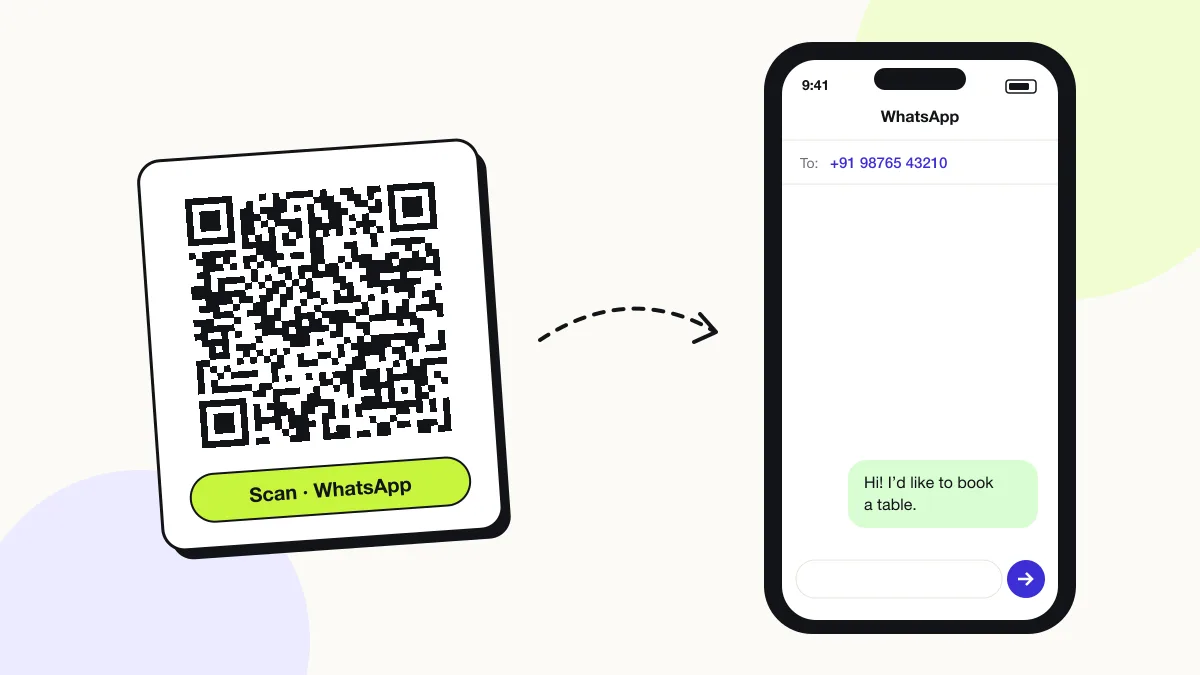
A WhatsApp QR code opens a WhatsApp chat with a set number and an optional pre-filled message. It stores a wa.me click-to-chat link, so the scanner messages you without saving your number first. It works for personal and WhatsApp Business numbers.
Just your email to download · no password needed
Short link:
Change where it points any time — the printed code stays the same. Free for 200 scans a month.
Encoded data
How to create a WhatsApp QR code
You create a WhatsApp QR code in 4 steps with the free generator above, and the code is ready to download as PNG or SVG.
- Enter your WhatsApp number with the country code.
- Write a pre-filled message that tells you where the scan came from.
- Scan the preview: WhatsApp opens a chat with your number and the message in the text box.
- Download the code for menus, shop windows, packaging or ads.
Looking to log into WhatsApp Web? That’s a different QR code
The WhatsApp Web login code is generated by WhatsApp itself on web.whatsapp.com and refreshes about every 20 seconds; no generator creates it.
- Open web.whatsapp.com on the computer.
- On the phone, open WhatsApp › Settings › Linked devices › Link a device.
- Scan the code on the computer screen with WhatsApp, not the camera app.
What does a WhatsApp QR code contain?
A WhatsApp QR code stores WhatsApp number, plus optional pre-filled message.
| Payload standard | wa.me click-to-chat URL |
|---|---|
| Native camera support | iPhone iOS 11+, Android 9+; opens the WhatsApp app |
| Needs internet to use | Yes |
| Change after printing | Yes — change the number or message in your QRJiffy dashboard |
| Scan tracking | Scans by day, device and country in your QRJiffy dashboard |
| Works with | WhatsApp and WhatsApp Business numbers |
| Recommended error correction | M (15%) |
| Minimum print size | 2 × 2 cm (0.8 in) |
| Field | Required | What it does | Example |
|---|---|---|---|
| WhatsApp number | Yes | The number registered on WhatsApp, with country code. | 919876543210 |
| Pre-filled message | Optional | Text that appears in the chat box, ready to send. | Hi! I’d like to book a table. |
WhatsApp QR code payload format
https://wa.me/<number>?text=<message>
https://wa.me/919876543210?text=Hi!%20I%E2%80%99d%20like%20to%20book%20a%20table.
wa.me is WhatsApp’s official click-to-chat link. The number contains digits only — no +, spaces or leading zeros — and the message is URL-encoded.
Format reference: How to use click to chat (WhatsApp Help Center)

Does WhatsApp have its own QR code?
Yes, WhatsApp has a built-in profile QR code (Settings › QR icon next to your name), but it scans only inside WhatsApp.
A wa.me QR code from this generator scans with any phone camera, carries a pre-filled message and prints in your colours.
How do I create a WhatsApp QR code for a group?
Open the group › Group info › Invite via link › copy the link, then turn that chat.whatsapp.com link into a QR code.
What happens when someone scans a WhatsApp QR code?
The phone camera decodes a WhatsApp QR code in under a second and shows a prompt; tapping it starts the action stored in the code. The prompt differs by device:
Phone with WhatsApp
The camera opens the wa.me link, which hands over to the WhatsApp app with the chat ready.
Phone without WhatsApp
The link opens a WhatsApp web page that offers to download the app.
Desktop
Laptops do not scan the code, but the same wa.me link opens WhatsApp Web or Desktop when clicked.
How many scans does a free WhatsApp QR code get?
A free account gets 200 scans a month across all its codes; Pro removes the limit for $30 a year. One scan is one phone opening the code. Each code uses a QRJiffy short link, so you can change where it points after printing and see scan counts. Compare Free and Pro.
Where to use WhatsApp QR codes
WhatsApp QR codes work in 4 common places: restaurant bookings, customer support, shop windows and real estate signs.
Restaurant bookings
Table tents start a booking chat with “Table for 2 at 8 pm” pre-written.
Customer support
Packaging opens a support chat with the product name already in the message.
Shop windows
Passers-by ask about stock and opening hours after closing time.
Real estate signs
Buyers message the agent with the property reference filled in.
WhatsApp QR code best practices
A WhatsApp QR code scans first time when it follows these 4 rules.
- Store the number with the country code and without + or zeros (the generator does this).
- Put a source tag in the message (“Hi from the menu!”) to see which placement brought the chat.
- Use a WhatsApp Business number to add away messages and quick replies.
- For groups, create an invite link in WhatsApp and encode it with the link to QR code generator.
WhatsApp QR code FAQ
Does a WhatsApp QR code need the scanner to save my number?
No. The wa.me link opens a chat without adding the number to contacts.
Can a WhatsApp QR code include a message?
Yes. The message appears in the text box, and the person taps Send.
Does a WhatsApp QR code work with WhatsApp Business?
Yes. wa.me links work for personal and WhatsApp Business numbers alike.
What if the scanner does not have WhatsApp?
The wa.me link opens a WhatsApp web page that offers to download the app or chat in WhatsApp Web.