 QRJiffy
Text to QR Code Generator
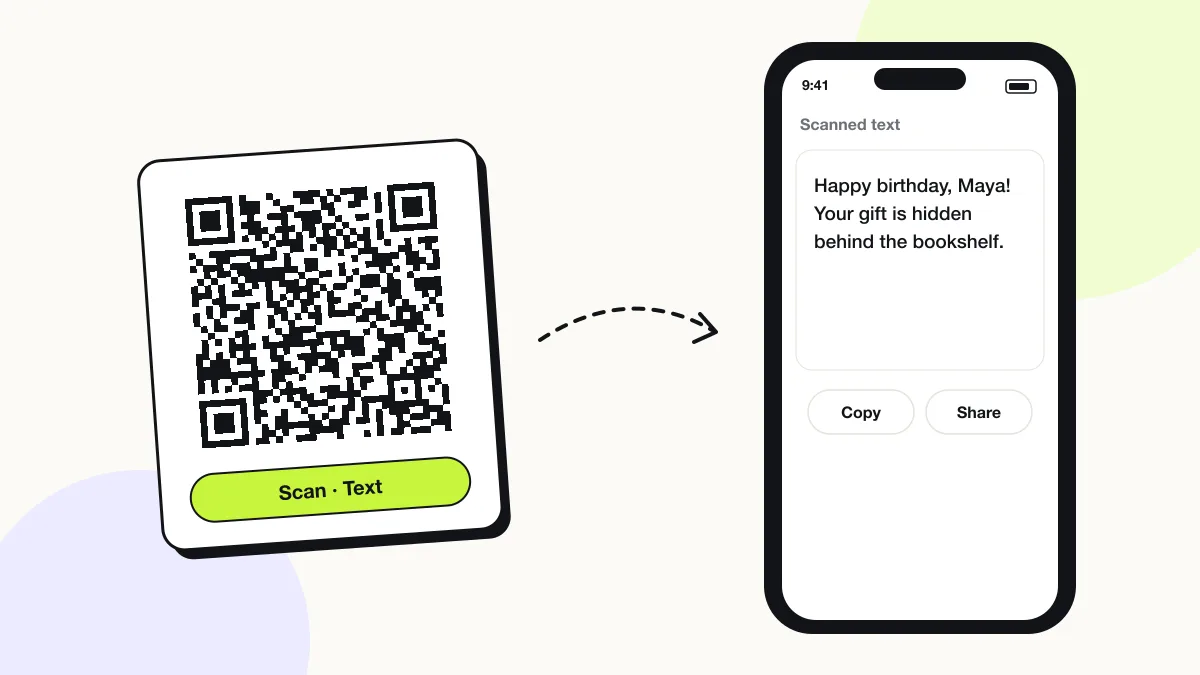
A text QR code displays a written message on the phone screen without opening a website. The message lives inside the code, so it reads offline — in a basement, on a plane or in a field. It suits labels, instructions, serial numbers and hidden gift notes.
Just your email to download · no password needed
Phones read this code directly, so it has no scan count.
Encoded data
How to create a text QR code
You create a text QR code in 4 steps with the free generator above, and the code is ready to download as PNG or SVG.
- Type or paste the message into the Your text box.
- Keep it under 300 characters for a code that scans from 30 cm.
- Check the preview and the byte count shown under it.
- Download the PNG or SVG and scan it with your phone to proofread the message.
What does a text QR code contain?
A text QR code stores message text, plus optional character set, error correction.
| Payload standard | Plain UTF-8 text (QR byte mode) |
|---|---|
| Native camera support | iPhone iOS 11+ (shows text, offers copy/search), Android 9+ (Google Lens) |
| Needs internet to use | No — the message is stored in the code |
| Editable after printing | No |
| Scan tracking | Not possible |
| Recommended error correction | M (15%); L (7%) for messages over 500 characters |
| Minimum print size | 2 × 2 cm for 50 characters; 4 × 4 cm for 300 characters |
| Field | Required | What it does | Example |
|---|---|---|---|
| Message text | Yes | The words the scanner sees. Up to 2,953 bytes; about 300 characters for a reliable small print. | Locker 14 — code 4821 |
| Character set | Optional | Latin text uses 1 byte per character; accented letters, emoji and Chinese, Arabic or Hindi characters use 2–4 bytes each. | UTF-8 |
| Error correction | Optional | Higher levels add redundancy and make long messages denser. | M |
Text QR code payload format
<any UTF-8 text>
Happy birthday, Maya! Your gift is hidden behind the bookshelf.
A text QR code has no prefix: the phone treats any content that is not a URL, WiFi, contact or event format as plain text. Emoji and non-Latin scripts are encoded as UTF-8 bytes.

How do I make a QR code with a hidden message for a gift?
Type the message into the generator above, download the code, and print it on a card or sticker — the message appears only when someone scans it.
- Birthday and anniversary notes
- Treasure-hunt clues
- Proposal or pregnancy reveals
- Thank-you messages in packaging
Does a text QR code work without internet?
Yes, a text QR code works fully offline because the message is stored inside the code and nothing loads from the web.
What is the difference between a text QR code and an SMS QR code?
A text QR code shows a message on screen; an SMS QR code opens the messaging app with a number and message ready to send.
Choose the SMS QR code generator when the scanner needs to text you, for example to join a list.
What happens when someone scans a text QR code?
The phone camera decodes a text QR code in under a second and shows a prompt; tapping it starts the action stored in the code. The prompt differs by device:
iPhone
The Camera app shows the first line of text in a banner. Tapping it opens the full text with Copy and Search options.
Android
Google Lens displays the text with Copy, Search and Translate buttons.
Offline
The text appears with no mobile data or WiFi, because nothing is downloaded.
Is there a scan limit on a text QR code?
No, a text QR code has no scan limit, because the phone reads the details straight from the pattern without visiting QRJiffy. That also means it works offline but cannot be edited or counted after printing; print a new code when the details change.
Where to use text QR codes
Text QR codes work in 4 common places: gift messages, equipment labels, lockers and rooms and classroom activities.
Gift messages
Hide a birthday note, treasure-hunt clue or proposal message behind a code on the wrapping.
Equipment labels
Print serial numbers, service dates and safety notes on machines without network access.
Lockers and rooms
Share door codes or check-out instructions that work with no signal.
Classroom activities
Reveal answers, riddles and vocabulary cards when students scan.
Text QR code best practices
A text QR code scans first time when it follows these 4 rules.
- Keep text under 300 characters; a 1,000-character message needs a 6 × 6 cm code.
- Write the purpose next to the code (“Scan for instructions”) so people know it is not a link.
- Leave passwords and personal data out — anyone who scans reads the text.
- Use line breaks for lists; phones display them as written.
Text QR code FAQ
How many characters fit in a text QR code?
A QR code holds up to 2,953 bytes, about 2,900 Latin characters at error correction L. Above 300 characters, the code needs a print larger than 4 × 4 cm.
Can a text QR code contain emoji?
Yes. Emoji are stored as UTF-8 and display on iPhone and Android, but each emoji uses 4 bytes.
Can I change the text after printing?
No. The text is part of the pattern; a new message needs a new code.
Is a text QR code private?
No. Anyone who scans the code reads the full message, so it is unsuitable for passwords or personal data.