 QRJiffy
LinkedIn QR Code Generator
A LinkedIn QR code opens a LinkedIn profile or company page, so the person scanning connects with you or follows your company without typing your name. Professionals print it on resumes, business cards and conference badges. Recruiters and attendees connect in one scan instead of searching among people with the same name.
Just your email to download · no password needed
Short link:
Change where it points any time — the printed code stays the same. Free for 200 scans a month.
Encoded data
How to create a LinkedIn QR code
You create a LinkedIn QR code in 5 steps with the free generator above, and the code is ready to download as PNG or SVG.
- Open your LinkedIn profile and copy its address, ideally your custom public URL.
- Paste the address above.
- Choose a dark colour that matches your resume or card design.
- Download SVG for resumes and print, or PNG for slides.
- Scan the printed resume or card to confirm the profile opens.
Where do I find my LinkedIn QR code?
Your LinkedIn QR code is in the LinkedIn mobile app: tap the QR icon in the search bar, then open the “My code” tab. The desktop website does not show the code, so use the mobile app or generate one here.
- Open the LinkedIn app on iPhone or Android.
- Tap the QR code icon on the right of the search bar.
- Open My code to display it, or Scan to read someone else’s.
- Tap Save to photos or Share my code to export it.
Should I put a LinkedIn QR code on my resume?
A LinkedIn QR code on a printed resume lets interviewers open your full profile, recommendations and portfolio from the paper copy in one scan. Place it in the header beside your contact details at 2 × 2 cm, and keep the full URL in text for applicant tracking systems that read text, not images.
- Header, top right: next to email and phone.
- Business card back: one code, no other graphics.
- Conference badge: 3 × 3 cm so it scans from arm’s length.
What does a LinkedIn QR code contain?
A LinkedIn QR code stores LinkedIn URL, plus optional custom public URL, colours, error correction.
| Payload standard | Plain linkedin.com URL (UTF-8 text) |
|---|---|
| Native camera support | iPhone iOS 11+, Android 9+ (Google Lens / camera) |
| Needs internet to use | Yes — the profile loads in the app or browser |
| Change after printing | Yes — point the code at a new profile or page in your QRJiffy dashboard; the printed code stays the same |
| Scan tracking | Scans by day, device and country in your QRJiffy dashboard |
| Opens in | The platform’s app when installed, otherwise the browser |
| Recommended error correction | M (15%); H (30%) when a logo covers the centre |
| Minimum print size | 2 × 2 cm (0.8 in) on a resume or business card |
| Field | Required | What it does | Example |
|---|---|---|---|
| LinkedIn URL | Yes | A personal profile (/in/) or company page (/company/) address. | https://www.linkedin.com/in/priya-raman |
| Custom public URL | Optional | A personalised profile address set in LinkedIn’s public profile settings. | linkedin.com/in/priya-raman |
| Colours | Optional | Code colour; dark navy or black on white suits resumes. | #0B2545 on #FFFFFF |
| Error correction | Optional | M (15%) for documents; Q (25%) for badges that bend. | M |
LinkedIn QR code payload format
https://www.linkedin.com/in/<custom-url>
https://www.linkedin.com/in/priya-raman
A custom public profile URL (linkedin.com/in/priya-raman) replaces the default ID-style URL (linkedin.com/in/priya-raman-4a7b19123). The custom version is 10 characters shorter and easier to read under the code.
Format reference: RFC 3986: URI generic syntax (IETF)

How do I shorten my LinkedIn URL before making a QR code?
LinkedIn shortens your profile address when you set a custom public URL under Me › View profile › Edit public profile & URL. A custom URL removes the trailing ID numbers and produces a cleaner code.
What happens when someone scans a LinkedIn QR code?
The phone camera decodes a LinkedIn QR code in under a second and shows a prompt; tapping it starts the action stored in the code. The prompt differs by device:
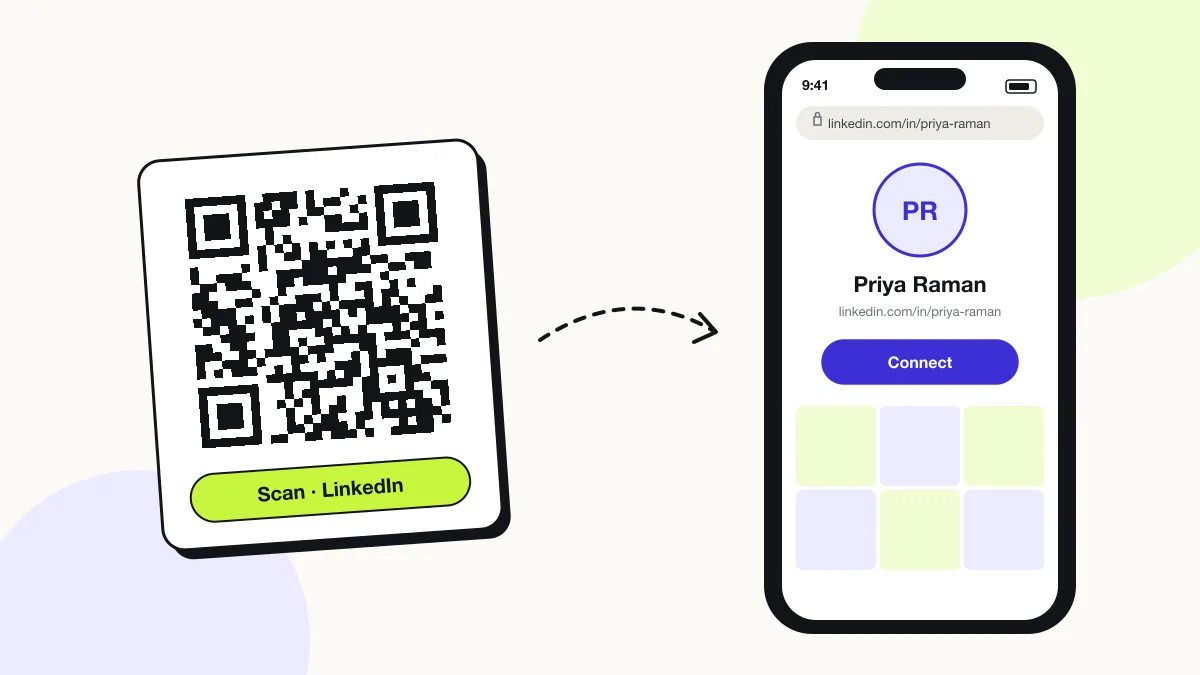
iPhone
The Camera shows “linkedin.com”; one tap opens the profile in the LinkedIn app with a Connect button.
Android
Google Lens or the Camera hands the link to the LinkedIn app through app links.
LinkedIn app scanner
The LinkedIn app’s own Scan tab reads both LinkedIn codes and standard QR codes generated here.
How many scans does a free LinkedIn QR code get?
A free account gets 200 scans a month across all its codes; Pro removes the limit for $30 a year. One scan is one phone opening the code. Each code uses a QRJiffy short link, so you can change where it points after printing and see scan counts. Compare Free and Pro.
Where to use LinkedIn QR codes
LinkedIn QR codes work in 4 common places: resumes and CVs, business cards, conference badges and slide decks.
Resumes and CVs
Interviewers open your full experience and recommendations from the paper copy.
Business cards
A connection request replaces a card that gets lost in a drawer.
Conference badges
Attendees connect between sessions without spelling your name.
Slide decks
The closing slide turns an audience into followers of your company page.
LinkedIn QR code best practices
A LinkedIn QR code scans first time when it follows these 5 rules.
- Set a custom public URL before generating the code.
- Make your profile public under Edit public profile so logged-out scanners see it.
- Keep the text URL on resumes for applicant tracking systems.
- Use a dark colour on white paper; avoid light grey codes on resumes.
- Test the printed code from 30 cm, the distance an interviewer holds a resume.
LinkedIn QR code FAQ
Can I create a LinkedIn QR code on desktop?
Yes, on this page. LinkedIn’s own code appears only in the mobile app, but this generator works in any desktop browser.
Is the LinkedIn QR code the same as the LinkedIn login or authenticator QR code?
No. Login and authenticator QR codes are one-time security codes generated during sign-in; a profile QR code permanently opens your public profile.
Can I make a QR code for a LinkedIn company page?
Yes. Paste the company page URL (linkedin.com/company/…) and scanners land on the page with a Follow button.
What happens to a LinkedIn QR code if I change my custom URL?
LinkedIn stops serving the old linkedin.com/in/ address, so paste the new URL into your QRJiffy dashboard; the printed code keeps working.