 QRJiffy
QR Code for Business
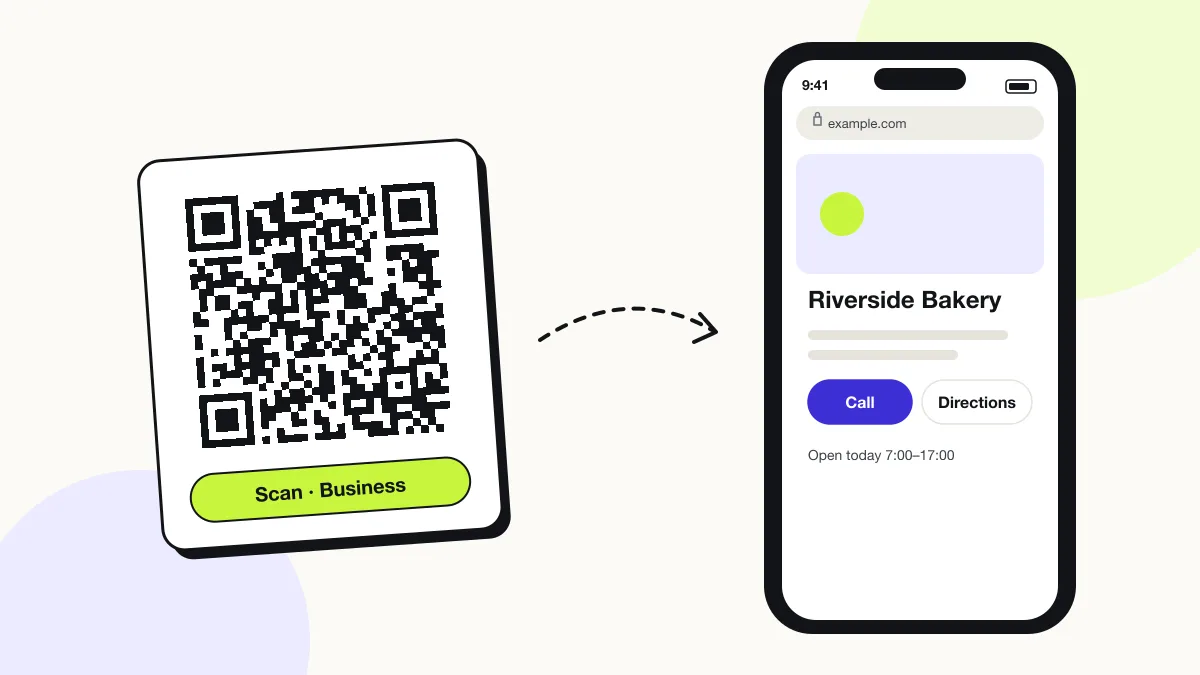
A business QR code opens a page with a business’s name, opening hours, address, phone number and links, so a customer reaches every contact option from one scan. It works on shop windows, vans, receipts and packaging. Build the page on QRJiffy with a free account — name, hours, address, call and directions buttons — or link a page you already run.
Just your email to download · no password needed
Short link:
Change where it points any time — the printed code stays the same. Free for 200 scans a month.
Encoded data
How to create a business QR code
You create a business QR code in 5 steps with the free generator above, and the code is ready to download as PNG or SVG.
- Choose the page the code opens: a contact page for general use, or a single-offer landing page for a campaign.
- Create one code per placement (window, van, receipt) so your QRJiffy dashboard shows which placement drives scans.
- Paste the full link into the generator and check the encoded data under the preview.
- Download SVG for print and test the code on one iPhone and one Android phone.
- Print a call to action beside the code, for example “Scan for hours and directions”.
What does a business QR code contain?
A business QR code stores business page link, plus optional opening hours, address and map link, call-to-action button, UTM parameters.
| Payload standard | Plain https:// URL stored as UTF-8 text |
|---|---|
| Native camera support | iPhone iOS 11+, Android 9+ (camera or Google Lens) |
| Needs internet to use | Yes — the scan opens a web page |
| Change after printing | Yes — change the destination in your QRJiffy dashboard; the printed code stays the same |
| Scan tracking | Scans by day, device and country in your QRJiffy dashboard; UTM tags add Google Analytics detail |
| Recommended error correction | M (15%); Q (25%) on vehicles and outdoor signs |
| Minimum print size | 2 × 2 cm (0.8 in); 10 cm for shop windows read from 1 m |
| Field | Required | What it does | Example |
|---|---|---|---|
| Business page link | Yes | The page the code opens: contact page, landing page or Google Business Profile. | https://example.com/about |
| Opening hours | Optional | The detail local customers look for first. | Mon–Sat 7:00–18:00 |
| Address and map link | Optional | Street address with a tap-to-navigate link. | 12 High St, Leeds |
| Call-to-action button | Optional | One primary action for a campaign page: book, buy, sign up or download. | Book a table |
| UTM parameters | Optional | Campaign tags that attribute visits to each printed placement. | ?utm_source=qr&utm_medium=van |
Business QR code payload format
https://<your-domain>/<page>?utm_source=qr&utm_medium=<placement>
https://example.com/about?utm_source=qr&utm_medium=window
QRJiffy counts scans for each code in your dashboard. A UTM-tagged link per placement (window, van, receipt) also separates the visits in Google Analytics.
Format reference: RFC 3986: URI generic syntax (IETF)

Which QR code should a business use?
A business picks the QR code type by action: a menu QR code for ordering, a Google review QR code for reviews, a vCard QR code for contacts, and a business page QR code for everything.
| Business goal | QR code type | What the scan does |
|---|---|---|
| Show the menu | Menu QR code | Opens the menu page or PDF |
| Collect Google reviews | Google review QR code | Opens the “write a review” box |
| Share staff contact details | vCard QR code | Saves the contact to the phone |
| Let guests join WiFi | WiFi QR code | Connects the phone to the network |
| Run a promotion | Coupon QR code | Shows the offer and promo code |
| Measure satisfaction | Survey QR code | Opens a short rating form |
| Grow followers | Social media QR code | Opens your social profiles |
What is a QR code landing page?
A QR code landing page is a mobile web page built for people who arrive from a scan: one headline, one image and one button that repeat the promise printed next to the code.
Scanners stand in a shop or street and read on a phone. A landing page with one action converts better than a full homepage with 40 navigation links. Match the headline word-for-word with the printed call to action.
Does Google Business Profile have its own QR code?
Yes, Google Business Profile creates a QR code that opens the review form for your business. It covers reviews only; a business QR code links to any page you choose, with your colours and an SVG file for print.
What happens when someone scans a business QR code?
The phone camera decodes a business QR code in under a second and shows a prompt; tapping it starts the action stored in the code. The prompt differs by device:
iPhone
The Camera app shows the domain in a yellow banner; one tap opens the page in Safari.
Android
The camera or Google Lens shows the link; one tap opens it in Chrome or the default browser.
Slow connections
The page loads over mobile data, so pages under 1 MB open in under 3 seconds on 4G. Compress images on the landing page.
How many scans does a free business QR code get?
A free account gets 200 scans a month across all its codes; Pro removes the limit for $30 a year. One scan is one phone opening the code. Each code uses a QRJiffy short link, so you can change where it points after printing and see scan counts. Compare Free and Pro.
Where to use business QR codes
Business QR codes work in 4 common places: shop windows, vehicles, receipts and invoices and campaign posters.
Shop windows
Show hours, phone and directions to passers-by after closing time.
Vehicles
A code on a van opens the quote or booking page while the van is parked.
Receipts and invoices
Link to reordering, loyalty sign-up or support.
Campaign posters
Send scanners to one landing page with one offer and one button.
Business QR code best practices
A business QR code scans first time when it follows these 5 rules.
- Use one destination per code; a code that tries to do five jobs does none well.
- Print a call to action that names the result: “Scan for opening hours”.
- Keep the landing page under 1 MB so it opens fast on mobile data.
- Name each code after its placement in your dashboard, for example “Van — rear door”.
- Size the code at 1/10 of the reading distance: 10 cm wide for a window read from 1 m.
Business QR code FAQ
Is a business QR code free?
Yes. A business QR code from QRJiffy is free to create, with no watermark on the PNG or SVG.
Can I put my logo in a business QR code?
Yes. A logo covering up to about 20% of the code scans reliably with error correction H (30%).
Can one QR code link to several business pages?
No, one QR code stores one link. Link it to a page with several buttons, such as a multi-link page, to offer more choices.
How do I measure scans of a business QR code?
Open the code in your QRJiffy dashboard: it counts scans by day, device and country. UTM tags add the visits to Google Analytics too.