 QRJiffy
Types of QR Codes
QR code types differ by the content they store and the action a phone takes when it scans them — open a link, join WiFi, save a contact, start a message or show a file. QRJiffy supports 41 QR code types in five categories; each one has its own free generator.
Everyday QR codes
Links, text, WiFi, contacts, calls, messages and calendar events — the payloads every phone camera reads natively.
File and media QR codes
Share PDFs, images, video and audio from a printed surface without asking anyone to type a link.
Business QR codes
Menus, reviews, feedback, forms, landing pages and profiles that turn foot traffic into actions.
Payment and product QR codes
Take payments, publish product data, prove authenticity and run promotions from packaging and point of sale.
How do QR code types compare?
Most types store their content inside the code; hosted types point to a page on QRJiffy that holds a file, menu or profile. The table lists what each type stores and how it behaves.
| QR code type | What happens on scan | Where the content lives | Payload |
|---|---|---|---|
| Link QR code | Open any web address in the scanner’s browser | Content or hosted page | https://<domain>/<path>?<query> |
| WiFi QR code | Join a WiFi network without typing the password | Stores the content | WIFI:T:<WPA|WEP|nopass>;S:<ssid>;P:<password>;H: |
| Text QR code | Show a short message on screen, even with no signal | Stores the content | <any UTF-8 text> |
| vCard QR code | Save your contact details to a phone in one tap | Content or hosted page | BEGIN:VCARD |
| Email QR code | Open a ready-to-send email with subject and message filled in | Stores the content | mailto:<address>?subject=<subject>&body=<message |
| SMS QR code | Send a pre-written text message to your number | Stores the content | SMSTO:<number>:<message> |
| Phone number QR code | Start a call to your number without dialling | Stores the content | tel:<number> |
| WhatsApp QR code | Open a WhatsApp chat with a message ready to send | Stores the content | https://wa.me/<number>?text=<message> |
| Event QR code | Add your event’s date, time and place to the calendar | Stores the content | BEGIN:VEVENT |
| Google Maps QR code | Open an address or pin in Maps with directions | Stores the content | https://www.google.com/maps/search/?api=1&query= |
| Social media QR code | Send followers to every profile from one code | Hosted page or link | https://<profiles-page-url> |
| Multi-link QR code | Offer several links — shop, book, watch — from one scan | Hosted page or link | https://<link-page-url> |
| Instagram QR code | Gain followers: open your Instagram profile in one scan | Content or hosted page | https://www.instagram.com/<username> |
| Facebook QR code | Get Page likes and group joins from print | Content or hosted page | https://www.facebook.com/<page-username> |
| LinkedIn QR code | Open your LinkedIn profile to connect in one scan | Content or hosted page | https://www.linkedin.com/in/<custom-url> |
| TikTok QR code | Win TikTok followers from packaging and posters | Content or hosted page | https://www.tiktok.com/@<username> |
| X (Twitter) QR code | Gain X followers or share a post from print | Content or hosted page | https://x.com/<handle> |
| Pinterest QR code | Send shoppers to your Pinterest boards and Pins | Content or hosted page | https://www.pinterest.com/<username>/<board>/ |
| Telegram QR code | Open a Telegram chat, channel, group or bot | Stores the content | https://t.me/<username> |
| YouTube QR code | Play a YouTube video or open your channel | Content or hosted page | https://youtu.be/<video-id>?t=<seconds> |
| PDF QR code | Open a brochure, manual or price list as a PDF | Hosted page or link | https://<host>/<path-to-file>.pdf |
| Image QR code | Show a photo, picture or album on the scanner’s screen | Hosted page or link | https://<host>/<path>.jpg | <shared album URL> |
| Video QR code | Play a video the moment someone scans | Hosted page or link | https://<host>/<video>.mp4 | <video page URL> |
| Music QR code | Play a song, voice message or audio guide | Hosted page or link | https://<host>/<file>.mp3 | <audio page URL> |
| Spotify QR code | Open a playlist, song or podcast in the music app | Content or hosted page | https://open.spotify.com/<playlist|track|album|a |
| Business QR code | Open your business page, hours and contact buttons | Hosted page or link | https://<your-domain>/<page>?utm_source=qr&utm_m |
| Menu QR code | Let diners view the menu on their phone | Hosted page or link | https://<your-domain>/menu · https://<host>/me |
| Google review QR code | Open your Google “write a review” box in one scan | Content or hosted page | https://g.page/r/<profile-id>/review · https:/ |
| Survey QR code | Collect ratings and feedback from a printed code | Hosted page or link | https://<form-tool>/<form-id>?<hidden-field>=<va |
| Google Forms QR code | Open a Google Form for sign-ups, quizzes and surveys | Content or hosted page | https://forms.gle/<id> · https://docs.google.c |
| Coupon QR code | Show a discount and promo code to redeem | Hosted page or link | https://<store>/discount/<CODE>?redirect=/<page> |
| App download QR code | Send scanners to your app in the App Store or Google Play | Content or hosted page | https://apps.apple.com/app/id<app-id> · http |
| QR code dog tag | Help whoever finds your pet contact you in one scan | Content or hosted page | Plain text (UTF-8) — shown on screen when scanne |
| Payment QR code | Get paid by scan through Venmo, PayPal, Cash App or UPI | Content or hosted page | https://venmo.com/u/<username> |
| Venmo QR code | Open your Venmo profile so people pay you in one scan | Stores the content | https://venmo.com/u/<username> |
| PayPal QR code | Open your PayPal.me page with the amount already filled in | Stores the content | https://paypal.me/<username>/<amount> |
| Cash App QR code | Turn your $Cashtag into a code that opens Cash App to pay | Stores the content | https://cash.app/$<cashtag>/<amount> |
| UPI QR code | Accept UPI payments from every UPI app in India | Stores the content | upi://pay?pa=<upi-id>&pn=<payee-name>&am=<amount |
| Crypto QR code | Receive Bitcoin and other coins without copying a long address | Stores the content | <scheme>:<address>?amount=<amount>&label=<label> |
| Product QR code | Open manuals, specs and reorder pages from the package | Content or hosted page | https://<domain>/<product-path>?utm_source=qr&ut |
| GS1 Digital Link QR code | One QR code for the checkout scanner and the shopper’s phone | Content or hosted page | https://<domain>/01/<GTIN-14>/10/<batch>/21/<ser |
Which QR code type should you use?
Pick the type by the action you want the scanner to take, not by where the code will be printed.
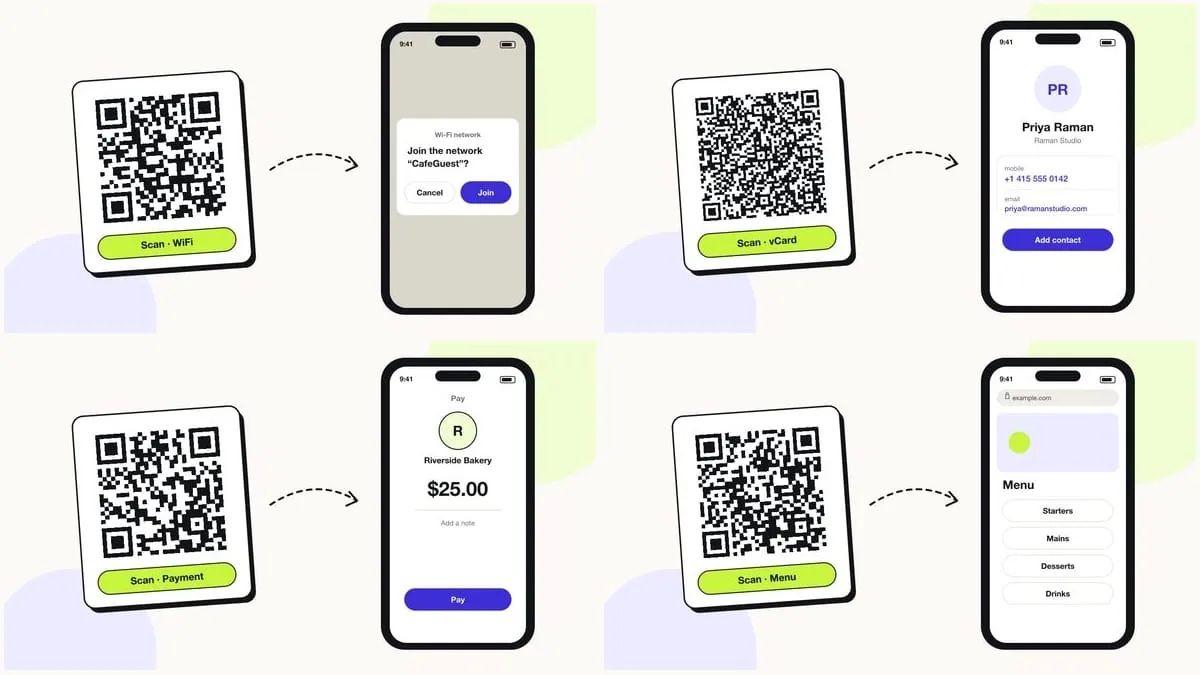
- To send people to any web page, use a URL QR code.
- To let guests join your network, use a WiFi QR code, which joins the network without opening a website.
- To share your contact details, use a vCard QR code so the phone offers “Add contact”.
- To start a conversation, use WhatsApp, SMS, email or phone QR codes, which pre-fill the message.
- To share a file, menu or profile page, use a hosted type such as PDF, menu or multi-link.
Social media QR codes
Send scanners straight to a profile, channel or chat so they can follow, subscribe or message in one tap.