 QRJiffy
QR Code Dog Tag & Pet ID Generator
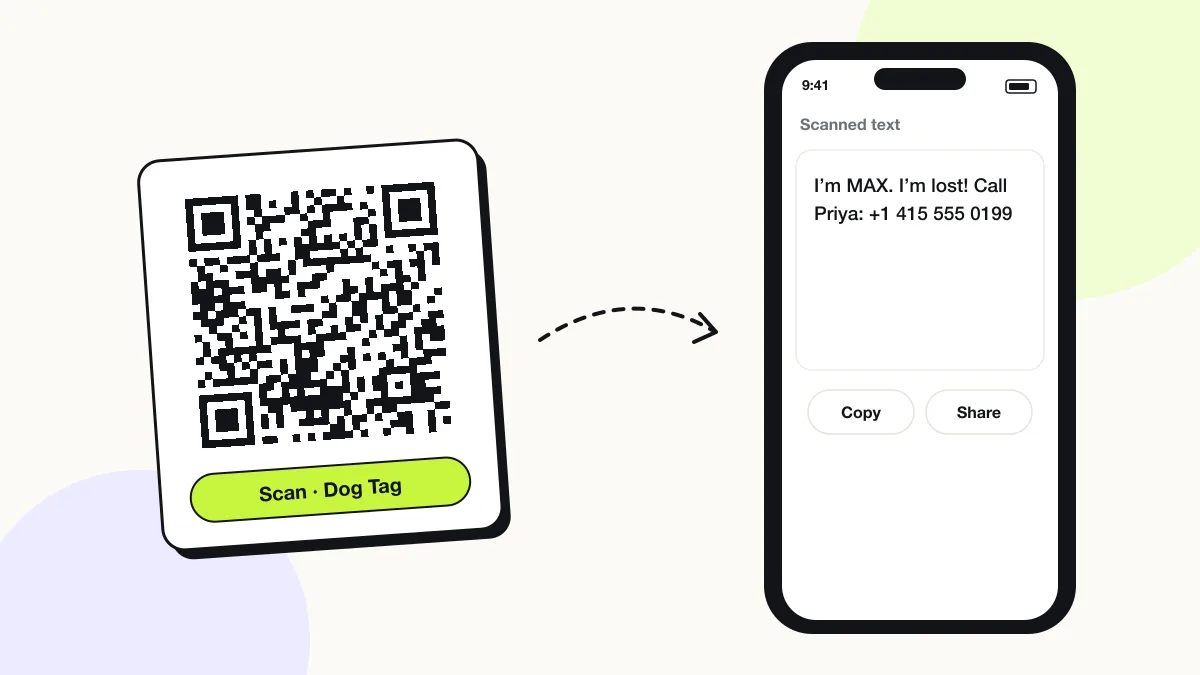
A QR code dog tag shows a pet’s name and the owner’s phone number when scanned, so the person who finds a lost dog contacts the owner in seconds. This generator stores the details inside the code itself: no subscription and no website that can shut down. Any phone camera reads it, even with no mobile signal.
Just your email to download · no password needed
Phones read this code directly, so it has no scan count.
Encoded data
How to create a QR code dog tag
You create a QR code dog tag in 5 steps with the free generator above, and the code is ready to download as PNG or SVG.
- Type your pet’s name, your phone number in international format and one key note.
- Keep the text under 100 characters so the code stays readable on a small tag.
- Leave error correction at H (30%); tags get scratched.
- Download SVG for laser engraving or PNG for a printed, laminated tag of at least 2.5 cm.
- Scan the finished tag with an iPhone and an Android phone before attaching it to the collar.
What does a QR code dog tag contain?
A QR code dog tag stores pet name, owner phone number, plus optional medical note, microchip note.
| Payload standard | Plain UTF-8 text inside the code (no web link) |
|---|---|
| Native camera support | iPhone iOS 11+ (text preview), Android 9+ via Google Lens |
| Needs internet to use | No — the details live in the code |
| Editable after printing | No — reprint the tag when your number changes |
| Scan tracking | None; no server is involved |
| Recommended error correction | H (30%) — tags get scratched and dirty |
| Minimum print size | 2.5 × 2.5 cm (1 in) with under 100 characters |
| Field | Required | What it does | Example |
|---|---|---|---|
| Pet name | Yes | The name the finder calls; it calms the dog. | Max |
| Owner phone number | Yes | One number in international format that you answer. | +1 415 555 0199 |
| Medical note | Optional | One critical line: medication, allergy or condition. | Needs daily insulin |
| Microchip note | Optional | “Microchipped” tells vets and shelters to scan for the chip. | Microchipped |
QR code dog tag payload format
Plain text (UTF-8) — shown on screen when scanned
I’m MAX. I’m lost!
Call Priya: +1 415 555 0199
Text stays readable offline and needs no server. iPhone shows text codes as a notification you tap to view; Android shows it in Google Lens. A tel: number in a separate code dials directly.

Do QR code dog tags need a subscription?
No. A QR code dog tag that stores your details as text needs no subscription and no mobile signal. Subscription tags store a link to a company’s profile page, which stops working when the subscription or the company ends.
| Attribute | Text tag (this page) | Hosted profile tag |
|---|---|---|
| Monthly fee | None | Often $2–$10 |
| Works with no mobile signal | Yes | No |
| Photo and vaccinations | No | Yes |
| Change phone number later | Reprint the tag | Edit online |
| GPS location of the scan | No | Some services, with the finder’s permission |
Do QR code dog tags track location?
No. A QR code dog tag has no GPS chip or battery; it only shows information when someone scans it. Some hosted tags ask the finder to share the phone’s location, and GPS trackers such as AirTag-style collars are separate devices.
Does a QR code dog tag replace a microchip?
No. A microchip is permanent and read by vets and shelters; a QR code tag is read by any passer-by with a phone. Use both, and keep the microchip registry details current.
What happens when someone scans a QR code dog tag?
The phone camera decodes a QR code dog tag in under a second and shows a prompt; tapping it starts the action stored in the code. The prompt differs by device:
iPhone
The camera shows a text preview banner; tapping it displays the full message with a tappable phone number.
Android
Google Lens shows the text with “Call” and “Copy” actions.
No signal
The details appear without mobile data, because the text lives in the code.
Is there a scan limit on a QR code dog tag?
No, a QR code dog tag has no scan limit, because the phone reads the details straight from the pattern without visiting QRJiffy. That also means it works offline but cannot be edited or counted after printing; print a new code when the details change.
Where to use QR code dog tags
QR code dog tags work in 4 common places: dog collars, cats, pet carriers and crates and horses and livestock.
Dog collars
A 2.5–3 cm engraved or printed tag on the collar ring.
Cats
A lightweight 2 cm tag on a breakaway collar.
Pet carriers and crates
A sticker on the carrier for travel and boarding.
Horses and livestock
A tag on the halter or a weatherproof sticker on the stable door.
QR code dog tag best practices
A QR code dog tag scans first time when it follows these 5 rules.
- Write the phone number in international format: +1 415 555 0199.
- Keep the text under 100 characters for a 2.5 cm tag.
- Use error correction H and a scratch-resistant engraved or epoxy tag.
- Add “Microchipped” so the finder takes the pet to a vet or shelter.
- Reprint the tag the day your phone number changes.
QR code dog tag FAQ
Is this QR code dog tag really free?
Yes. The code is free to create and download, with no subscription; a free QRJiffy account saves it, and you pay only for printing or engraving the tag.
How big should a QR code dog tag be?
At least 2.5 × 2.5 cm (1 in) for under 100 characters of text. Larger dogs carry 3 cm tags that scan faster.
Can I engrave a QR code on a metal dog tag?
Yes. Send the SVG file to a laser engraver; dark anodised aluminium engraved to bright metal gives strong contrast.
What should I put on a QR code dog tag?
The pet’s name, one phone number you answer and one critical medical or microchip note.