 QRJiffy
QR Code Generator With Logo
A custom QR code with a logo places your brand mark in the centre of the code and styles its dots, corners and colours, while error correction level H keeps it scannable. Upload a logo, style the code and download a print-ready SVG.
Just your email to download · no password needed
Short link:
Change where it points any time — the printed code stays the same. Free for 200 scans a month.
How do you add a logo to a QR code?
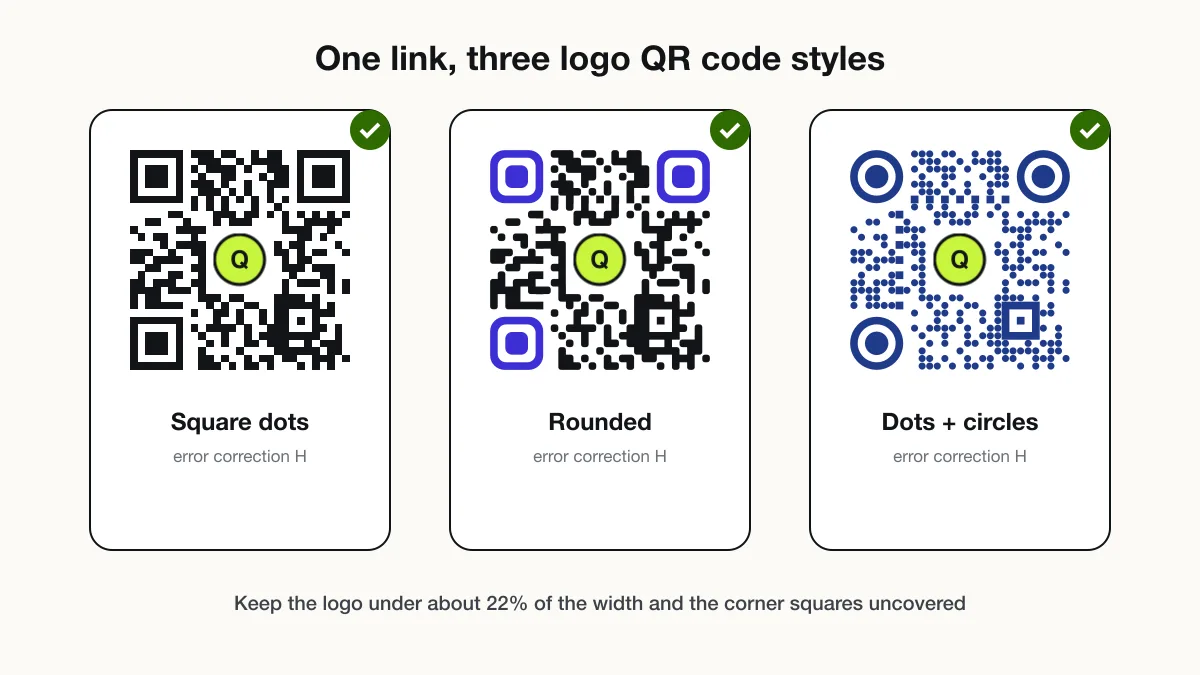
You add a logo to a QR code by uploading the image to the designer, which centres it, raises error correction to H and clears the modules behind it.
- Enter the link or text the code opens.
- Upload a square logo with a transparent background.
- Keep the logo size at or below 22% of the code width.
- Choose dot, corner and colour styles, and watch the contrast note.
- Download SVG for print, then test-scan it from 30 cm and 1 m.
Why does a QR code still scan with a logo in the middle?
A QR code still scans with a logo because Reed–Solomon error correction rebuilds missing data, and level H recovers up to 30% of the codewords.
The logo covers modules that the scanner treats as damage. The three corner squares (finder patterns) must stay uncovered, because the scanner uses them to locate and straighten the code.
| Level | Recoverable data | Failed above (tested) | Safe logo width |
|---|---|---|---|
| L | 7% | 22% of width | No logo |
| M | 15% | 33% of width | Up to 18% |
| Q | 25% | 34% of width | Up to 18% |
| H | 30% | 42% of width | Up to 25% |
Which colours work for a custom QR code?
Any colour pair works when the dots are darker than the background and the contrast ratio is at least 4:1.
- Use dark dots on a light background; inverted codes fail on many older scanners.
- Give the corner squares a darker or matching colour, never a lighter one.
- Avoid red on green and yellow on white, which drop below 2:1.
- Keep the quiet zone (4 modules) in the background colour.
QR code with logo FAQ
Does adding a logo stop a QR code from scanning?
No, as long as the logo stays at or below 25% of the code width and error correction is set to H, which restores up to 30% of damaged data. In our scan tests a logo failed only above 42% of the width. QRJiffy forces level H whenever a logo is added.
Is a QR code with a logo free on QRJiffy?
Yes. Logo QR codes carry no watermark, and a free account gets 200 scans a month across all its codes. Pro removes the scan limit for $30 a year.
What logo file works best in a QR code?
A square PNG or SVG with a transparent background works best. QRJiffy places it on a solid pad in the background colour so the logo edges do not touch the modules.
Can I change the colour of a QR code?
Yes. Any colour works when the code is darker than the background with a contrast ratio of at least 4:1. The designer warns you when contrast falls below that.