 QRJiffy
QR Code Scan Tests: What Breaks a QR Code
We generated 5,136 QR code images and read each one with two open-source decoders, 10,272 reads in total, to measure how large a logo can be, how much damage a code survives, how content length changes size, and which colours scan.
Updated · QRJiffy team
How did we test the QR codes?
We built every code with the same encoder our generator uses, then read it with jsQR and ZXing; a test passed only when both decoders returned the exact text. Tests ran in November 2026.
- Two decoders: jsQR, a JavaScript decoder used in many web scanners, and ZXing (zxing-cpp), the open-source engine family behind many Android scanner apps.
- Two conditions: a clean image, and a phone-photo model that shrinks the code to a few pixels per module, blurs it and adds sensor noise. Colour tests add a dim-light condition with less light and more noise.
- Two contents: a 30-character short link (
https://qrjiffy.com/r/AbC2xYz/) and a 123-character tracked web address. - Repeatable: random choices use a fixed seed, so the same script gives the same numbers. Download the raw results (JSON).
A simulation is not a phone. Real cameras add glare, tilt, motion and autofocus delays, and phone scanners such as Apple’s and Google’s use their own decoders. Treat these results as a controlled comparison between options, and test your final print on real phones.
How big can a logo in a QR code be?
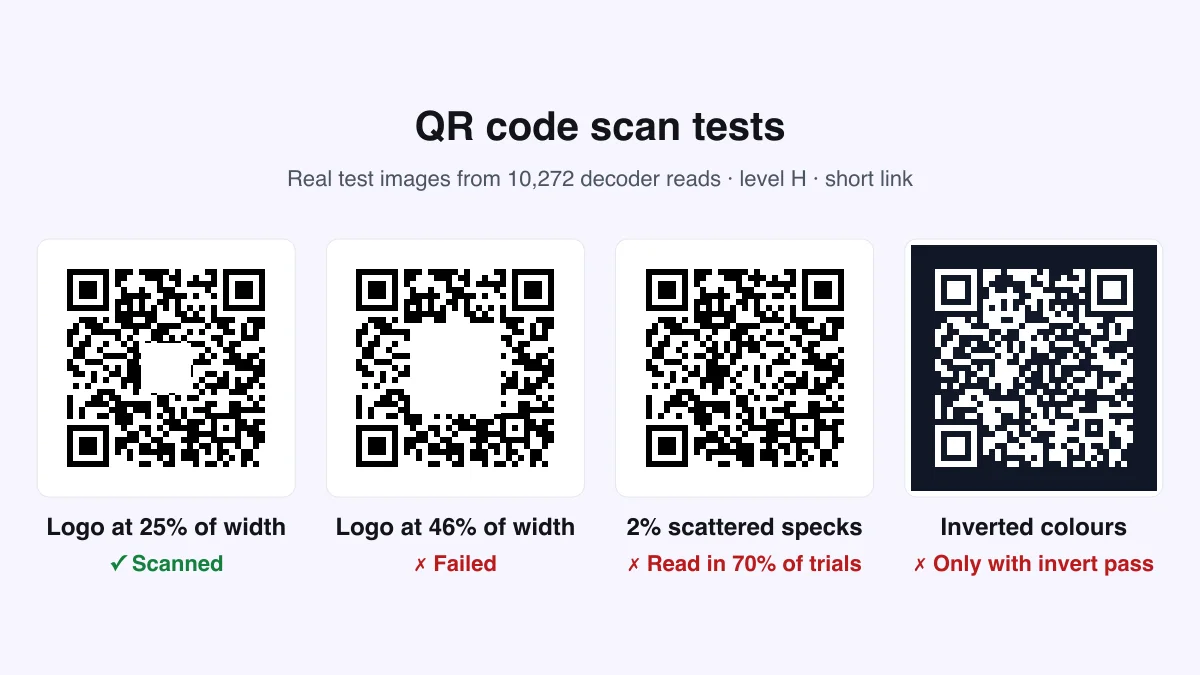
A centre logo on a short-link code stopped scanning above 42% of the code width at level H, 33% at level M and 22% at level L. By area, that is 18%, 11% and 5% of the code. The widely repeated advice that a logo can cover up to 30% of the code’s area failed in every one of our tests.
| Level | Short link | Long URL |
|---|---|---|
| L | 22% of width (5% of area), version 2 | 23% of width (5% of area), version 6 |
| M | 33% of width (11% of area), version 3 | 32% of width (10% of area), version 8 |
| Q | 34% of width (12% of area), version 3 | 44% of width (19% of area), version 9 |
| H | 42% of width (18% of area), version 4 | 48% of width (23% of area), version 11 |
Longer content allowed a slightly larger logo at Q and H (48% of the width at H) because the bigger grid spreads data over more modules. Keep logos at or below 25% of the width: that leaves most of the error budget for scratches and print faults. The QR code with logo generator caps logos at 26% and switches to level H automatically.
How much scattered damage can a QR code survive?
Very little: with 2% of the modules flipped at random, level H read 70% of the time and level L only 25%; at 6% random damage no code read at all. Error correction counts damaged codewords, not modules, and each codeword spans 8 modules, so scattered specks spoil many codewords at once.
| Modules damaged | Level L | Level M | Level Q | Level H |
|---|---|---|---|---|
| 0% | 100% | 100% | 100% | 100% |
| 2% | 25% | 68% | 57% | 70% |
| 4% | 0% | 3% | 10% | 18% |
| 6% | 0% | 0% | 0% | 0% |
One solid patch, like a logo or a sticker, is far easier to recover from than the same amount of damage scattered as specks, scuffs or faded print. Protect outdoor and high-touch codes with lamination instead of relying on a higher level. The error correction guide explains the levels.
Does a short link make a QR code easier to scan?
Yes: the 30-character short link made a 29 × 29 grid, while the 123-character address needed 49 × 49, so at the same printed size the short-link code read from about 2× the distance. Fewer modules means each one is bigger on paper and in the camera image.
In the phone-photo model the short-link code read from 1.5 camera pixels per module and the long one needed 1.75, because the denser grid also blurs together sooner. The table shows how the grid grows with content length at each error correction level.
| Characters | L | M | Q | H |
|---|---|---|---|---|
| 25 | 25 (v2) | 25 (v2) | 29 (v3) | 33 (v4) |
| 50 | 29 (v3) | 33 (v4) | 37 (v5) | 41 (v6) |
| 75 | 33 (v4) | 37 (v5) | 45 (v7) | 49 (v8) |
| 100 | 37 (v5) | 41 (v6) | 49 (v8) | 57 (v10) |
| 150 | 45 (v7) | 49 (v8) | 57 (v10) | 65 (v12) |
| 200 | 53 (v9) | 57 (v10) | 65 (v12) | 77 (v15) |
| 300 | 61 (v11) | 69 (v13) | 81 (v16) | 89 (v18) |
See the QR code size guide for print sizes by scanning distance.
Which QR code colours scan?
Every colour pair with a contrast ratio of 4:1 or more read in good light, but in dim light only black and black on cream read at least 80% of the time. Pale colours such as yellow, light green and sky blue failed even in good light.
| Colours | Contrast | Good light | Dim light |
|---|---|---|---|
| Black | 21:1 | 100% | 90% |
| Black on cream | 15.9:1 | 100% | 85% |
| Navy | 10.4:1 | 100% | 75% |
| Charcoal | 10.3:1 | 100% | 65% |
| Burgundy | 10:1 | 100% | 70% |
| Dark green | 9.1:1 | 100% | 70% |
| Purple | 8.7:1 | 100% | 55% |
| Navy on light blue | 7.3:1 | 100% | 50% |
| Dark red on pink | 7.2:1 | 100% | 70% |
| Black on mid grey | 7:1 | 100% | 20% |
| Brand violet | 5.6:1 | 100% | 30% |
| Teal | 5.5:1 | 100% | 30% |
| Red | 4.8:1 | 100% | 50% |
| Green on yellow | 3.8:1 | 100% | 0% |
| Blue | 3.7:1 | 100% | 5% |
| Orange | 2.8:1 | 80% | 0% |
| Pink | 2.6:1 | 30% | 0% |
| Mid grey | 2.5:1 | 0% | 0% |
| Sky blue | 1.7:1 | 0% | 0% |
| Yellow | 1.5:1 | 0% | 0% |
| Pale grey | 1.5:1 | 0% | 0% |
| Light green | 1.4:1 | 0% | 0% |
Two patterns stand out. Coloured or grey backgrounds lost the most in dim light, even with a decent contrast ratio, because they shrink the brightness gap the scanner relies on. And dark navy, burgundy and green held up better than lighter brand colours. For bars, restaurants and evening events, use a near-black code on white. The QR code colours guide covers colour choice.
Do inverted QR codes scan?
Only when the scanner looks for them: both decoders read our light-on-dark code 100% of the time with their invert option on and 0% with it off. Whether a scanner runs that second pass depends on the app or device, so print a dark code on a light background to be safe.
What should you change after these tests?
Use a short link, keep logos at or below 25% of the width, print a dark code on white, and protect codes from scuffs rather than relying on error correction.
- Shorten content: a short link roughly doubled the readable distance in our tests.
- Size logos at 25% of the width or less with level H.
- Choose contrast of 7:1 or more for dim places; 4:1 is the floor in good light.
- Laminate codes on tables, doors and vehicles.
- Test the final print on an iPhone and an Android phone.
Make a code with these defaults in the free QRJiffy generator.
Frequently asked questions
How big can a logo in a QR code be?
In our tests a centre logo stopped working above 42% of the code width (18% of its area) at level H on a short link. Keep logos at or below 25% of the width to leave room for wear and print errors.
Does error correction protect against dirt and scratches?
Only against damage in one area. Scattered specks spread across the code defeat every level quickly: with 18% success at 4% random damage, level H barely helped.
Can I use your data?
Yes. The raw results are free to reuse under CC BY 4.0 with credit to QRJiffy. Download them as JSON from this page.