 QRJiffy
Cash App QR Code Generator
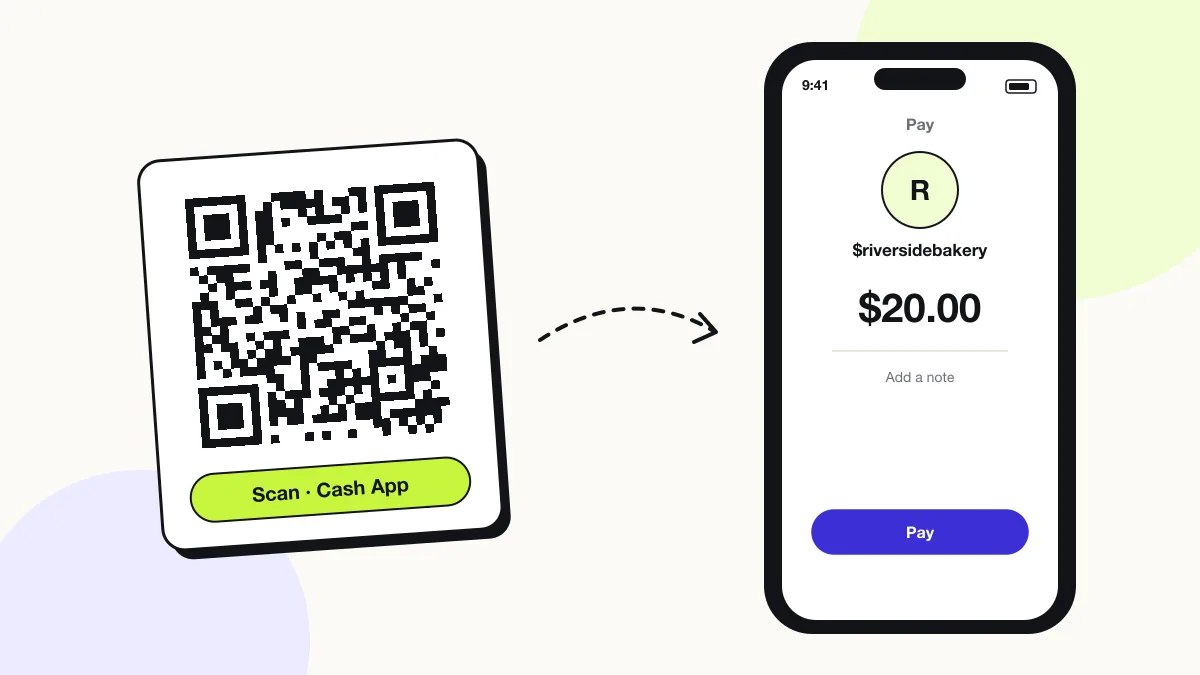
A Cash App QR code opens your $Cashtag page on the payer’s phone with an optional amount filled in, so they send money from Cash App in one tap. Cash App runs in the United States and the United Kingdom. The code stores your public cash.app link, which is the same link Cash App lets you share by text.
Just your email to download · no password needed
Short link:
Change where it points any time — the printed code stays the same. Free for 200 scans a month.
Encoded data
How to create a cash App QR code
You create a cash App QR code in 5 steps with the free generator above, and the code is ready to download as PNG or SVG.
- Open Cash App and copy your $Cashtag from your profile.
- Paste it into the $Cashtag field.
- Add an amount for a fixed price.
- Download the code, then print your $Cashtag under it.
- Scan the printed code with another phone and confirm your name appears.
What does a cash App QR code contain?
A cash App QR code stores $Cashtag, plus optional amount, colours.
| Payload standard | Cash App URL (https://cash.app/$…) |
|---|---|
| Native camera support | iPhone iOS 11+, Android 9+; also scannable in Cash App |
| Needs internet to use | Yes — Cash App confirms the payment online |
| Editable after printing | Yes — change the $Cashtag link or amount in your QRJiffy dashboard |
| Scan tracking | Scans in your QRJiffy dashboard; payments in Cash App activity |
| Recommended error correction | Q (25%) for counter signs and stickers that get handled |
| Minimum print size | 2.5 × 2.5 cm (1 in) on a counter sign; 2 × 2 cm on a flyer |
| Field | Required | What it does | Example |
|---|---|---|---|
| $Cashtag | Yes | Your unique public Cash App identifier, 1–20 characters with at least 1 letter. | $riversidebakery |
| Amount | Optional | A fixed amount pre-filled on the payer’s screen. | 20 |
| Colours | Optional | Cash App green (#00D632) needs a dark outline or darker shade; use #008A20 for reliable contrast. | #008A20 on #FFFFFF |
Cash App QR code payload format
https://cash.app/$<cashtag>/<amount>
https://cash.app/$riversidebakery/20
The amount is the last path segment. Without an amount, the payer types it in Cash App.
Format reference: RFC 3986: URI generic syntax (IETF)

Where is my Cash App QR code?
Your Cash App QR code is on your profile: tap your profile picture, then the QR icon, to show it.
The in-app code is built for scanning inside Cash App. A QRJiffy Cash App QR code opens from any phone camera, carries an optional amount and downloads as a print-ready SVG.
Can a Cash App QR code request a specific amount?
Yes, a Cash App QR code pre-fills the amount added to the link, for example cash.app/$yourname/20.
Can businesses use a Cash App QR code?
Yes, businesses use a Cash App QR code with a Cash App for Business account, which charges a fee on each payment received.
What happens when someone scans a cash App QR code?
The phone camera decodes a cash App QR code in under a second and shows a prompt; tapping it starts the action stored in the code. The prompt differs by device:
iPhone
The Camera opens the cash.app link in Cash App, which shows your name and the amount for the payer to confirm.
Android
Google Lens opens the link and Android hands it to Cash App through its app link.
No Cash App installed
The link opens a cash.app web page that prompts the payer to download the app.
How many scans does a free cash App QR code get?
A free account gets 200 scans a month across all its codes; Pro removes the limit for $30 a year. One scan is one phone opening the code. Each code uses a QRJiffy short link, so you can change where it points after printing and see scan counts. Compare Free and Pro.
Where to use cash App QR codes
Cash App QR codes work in 4 common places: street vendors, rent and bills, tips and sports clubs.
Street vendors
Food trucks and stalls take payments without a card terminal.
Rent and bills
Roommates scan the code to send their share.
Tips
Barbers, drivers and performers display an amount-free tip code.
Sports clubs
Teams collect subs and kit fees at training.
Cash App QR code best practices
A cash App QR code scans first time when it follows these 5 rules.
- Print the payee name next to the code so customers can check it against the name their app shows before they pay.
- Check your signs daily: QR scams (“quishing”) paste a fake payment sticker over the real code.
- Laminate counter signs or print them behind acrylic so a sticker cannot be placed on top unnoticed.
- Scan the downloaded file with your own phone and send a 1-unit test payment before you print 100 copies.
- Choose error correction Q for signs that get touched, splashed or scratched.
Cash App QR code FAQ
Is a Cash App QR code free?
Yes. QRJiffy creates the code free, and personal Cash App payments from a linked debit card or balance carry no fee.
What happens to a Cash App QR code if I change my $Cashtag?
The old cash.app link stops finding you, so paste the new $Cashtag link into your QRJiffy dashboard; the printed code keeps working.
Can someone steal money with my Cash App QR code?
No. The code only shows your public $Cashtag; it cannot withdraw money from your account.
Does a Cash App QR code work in the UK?
Yes. Cash App operates in the United States and the United Kingdom, and payments work between accounts in the same country.