 QRJiffy
vCard QR Code Generator
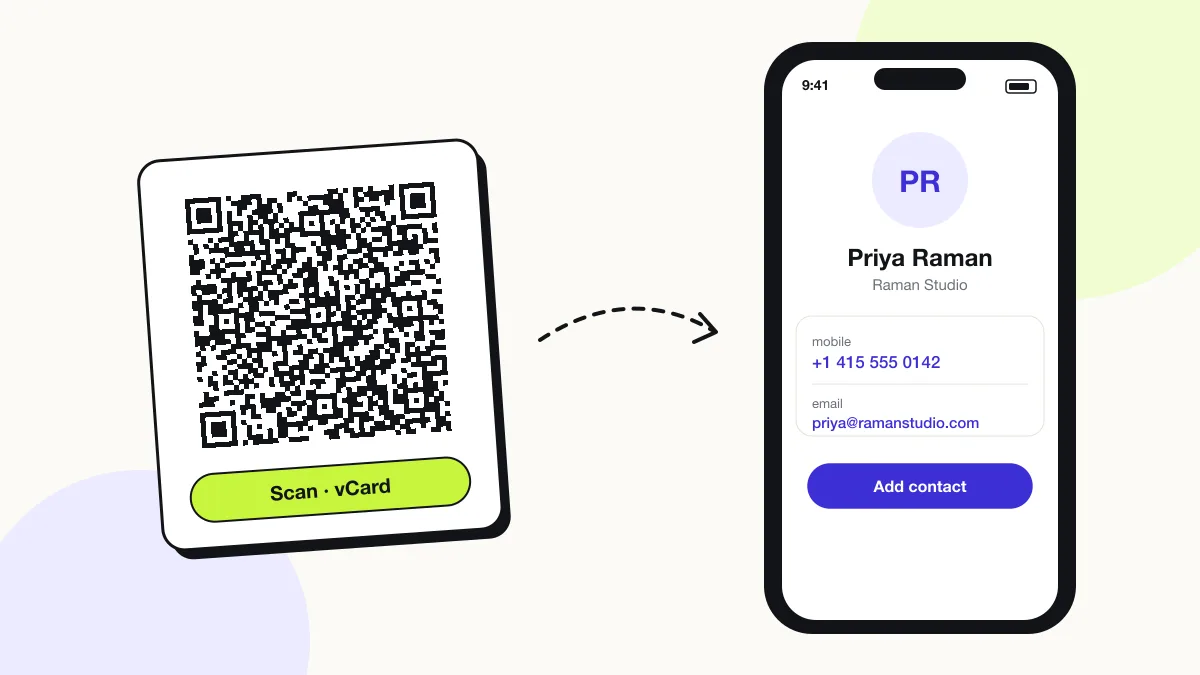
A vCard QR code saves a person’s name, phone number, email and address to the scanner’s contacts in one tap. It stores a vCard 3.0 contact card inside the code, so the phone offers “Create new contact” with every field filled in. It works offline on iPhone and Android.
Just your email to download · no password needed
Phones read this code directly, so it has no scan count.
Encoded data
How to create a vCard QR code
You create a vCard QR code in 5 steps with the free generator above, and the code is ready to download as PNG or SVG.
- Enter your first name — the only required field.
- Add phone numbers in international format, starting with + and the country code.
- Fill in email, company, job title, website and address as needed.
- Scan the preview with your phone and check that every field lands in the right place.
- Download the SVG for print on business cards, badges or email signatures.
What does a vCard QR code contain?
A vCard QR code stores name, plus optional phone numbers, email, company and job title, website, address.
| Payload standard | vCard 3.0 (RFC 2426) |
|---|---|
| Native camera support | iPhone iOS 11+, Android 9+ (Google Lens / camera) |
| Needs internet to use | No — the contact is stored in the code |
| Change after printing | No — print a new card with the new details |
| Works offline | Yes, the contact saves without internet |
| Recommended error correction | M (15%); L (7%) when 8+ fields are filled |
| Minimum print size | 2.5 × 2.5 cm (1 in) on a business card |
| Field | Required | What it does | Example |
|---|---|---|---|
| Name | Yes | First and last name, saved as the contact title. | Priya Raman |
| Phone numbers | Optional | Mobile and work numbers in international format, so they dial from any country. | +14155550199 |
| Optional | Saved as a tappable email address. | priya@ramanstudio.com | |
| Company and job title | Optional | Shown under the name in the contact card. | Raman Studio · Creative Director |
| Website | Optional | Saved as a link on the contact. | https://ramanstudio.com |
| Address | Optional | Street, city, region, postcode and country; opens in Maps from the contact. | 220 Market St, San Francisco |
vCard QR code payload format
BEGIN:VCARD
VERSION:3.0
N:<last>;<first>;;;
FN:<full name>
ORG:<company>
TITLE:<job title>
TEL;TYPE=CELL:<mobile>
EMAIL:<email>
URL:<website>
ADR;TYPE=WORK:;;<street>;<city>;<region>;<zip>;<country>
END:VCARD
BEGIN:VCARD
VERSION:3.0
N:Raman;Priya;;;
FN:Priya Raman
ORG:Raman Studio
TEL;TYPE=CELL:+14155550199
EMAIL:priya@ramanstudio.com
END:VCARD
vCard 3.0 (RFC 2426) is the version iOS Contacts and Google Contacts read most reliably from a QR code. Commas and semicolons inside values are escaped with a backslash.
Format reference: RFC 6350: vCard format specification (IETF)

What is the difference between vCard and MECARD QR codes?
vCard holds every contact field and multiple numbers; MECARD is a shorter format from NTT Docomo with fewer fields that creates a less dense code.
| Attribute | vCard 3.0 | MECARD |
|---|---|---|
| Fields | Name, multiple phones, emails, company, title, address, URL, note | Name, phone, email, address, URL, note |
| Code density | Higher | Lower |
| iPhone support | Yes | Yes |
| Android support | Yes | Yes |
Can a vCard QR code include a photo?
No, a vCard QR code cannot carry a usable photo, because an image exceeds the 2,953-byte capacity of a QR code.
A hosted contact page shows a photo and social links, because the code then stores only a link to that page.
Do vCard QR codes work on both iPhone and Android?
Yes, iPhone (iOS 11+) and Android (9+ with Google Lens) both read vCard 3.0 codes from the camera and offer to save the contact.
What happens when someone scans a vCard QR code?
The phone camera decodes a vCard QR code in under a second and shows a prompt; tapping it starts the action stored in the code. The prompt differs by device:
iPhone
The Camera shows a Contact banner; tapping it opens a filled-in card with Create New Contact and Add to Existing Contact.
Android
The camera or Google Lens shows Add contact, which opens the Contacts app with the fields filled in.
Offline
The contact saves with no signal, because every field is inside the code.
Is there a scan limit on a vCard QR code?
No, a vCard QR code has no scan limit, because the phone reads the details straight from the pattern without visiting QRJiffy. That also means it works offline but cannot be edited or counted after printing; print a new code when the details change.
Where to use vCard QR codes
vCard QR codes work in 4 common places: business cards, conference badges, email signatures and shop counters and vans.
Business cards
One scan saves every detail on the card. The QR codes for business cards guide covers size and placement.
Conference badges
Attendees exchange contacts without typing or swapping paper.
Email signatures
A small vCard code lets readers on a desktop save the contact from their phone.
Shop counters and vans
Customers save the business number for repeat bookings.
vCard QR code best practices
A vCard QR code scans first time when it follows these 4 rules.
- Write phone numbers with + and the country code so they dial internationally.
- Fill only the fields people need — 5 fields scan faster than 12.
- Print the code at least 2.5 × 2.5 cm on a business card.
- Test with both an iPhone and an Android phone before ordering a print run.
vCard QR code FAQ
How many fields can a vCard QR code hold?
All standard fields fit, but every field adds modules. A card with name, 2 phones, email, company and website scans reliably at 2.5 cm; a full 13-field card needs about 3.5 cm.
Which vCard version does the QR code use?
vCard 3.0, which iPhone Contacts, Google Contacts and Outlook all import without errors.
Can I update my vCard after printing?
No. The contact details sit inside the pattern, so a new phone number or job title means a new code.
Is a vCard QR code the same as a digital business card?
No. A vCard QR code saves a contact directly; a digital business card is a hosted web page that a link QR code opens.