 QRJiffy
QR Code Not Working? Causes and Fixes
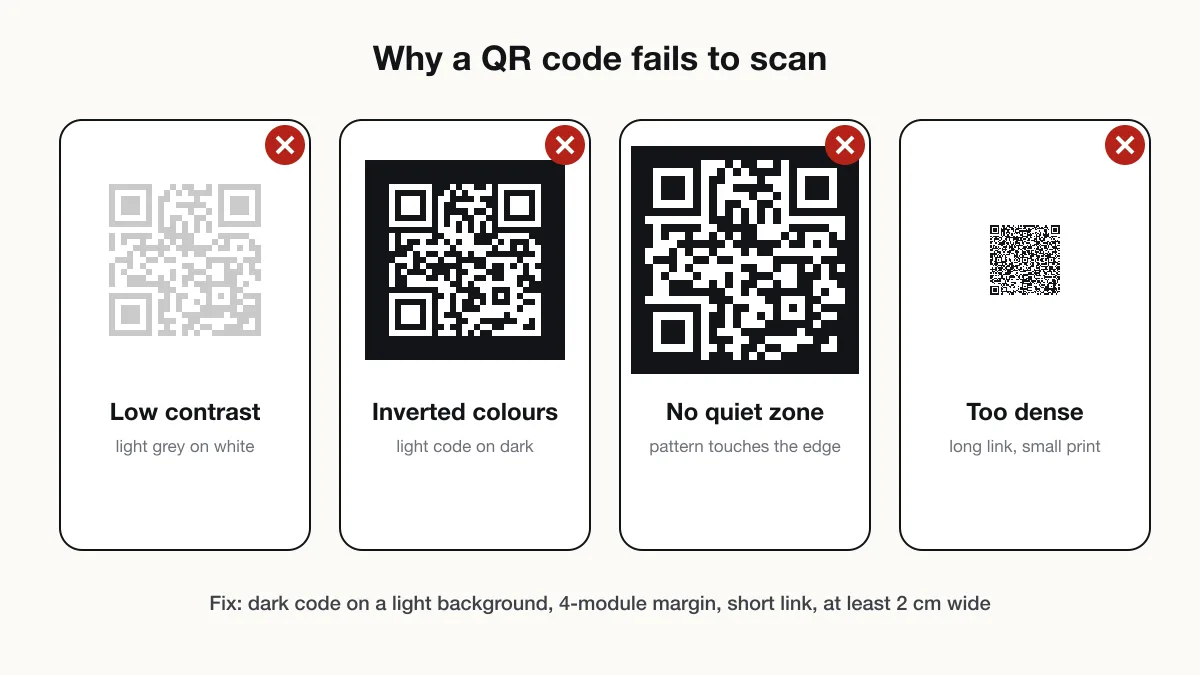
A QR code fails to scan because of 4 print problems — size, quiet zone, contrast and data density — or opens an error because the link behind it is broken. The table below matches each symptom to its cause and fix.
Updated · QRJiffy team
Why is my QR code not working?
A QR code does not work when the camera cannot separate its modules or when the content it points to no longer exists. The first group is a print problem; the second is a content problem. The table lists the 10 most common causes in the order to check them.
| Symptom | Cause | Fix |
|---|---|---|
| Camera shows nothing | QR scanning switched off in camera settings | Turn on “Scan QR codes” in Camera settings, or use Google Lens |
| Camera shows nothing | Code printed too small for the distance | Print at least 2 cm wide, or 1/10 of the scanning distance |
| Camera shows nothing | Missing quiet zone (text or border touches the code) | Leave 4 modules of blank margin on every side |
| Camera shows nothing | Low contrast or inverted colours | Use a dark code on a light background, contrast 4:1 or higher |
| Focus keeps hunting | Glossy, curved or reflective surface | Use matte print; move the code to a flat area |
| Scans slowly or on some phones only | Too much data, so modules are tiny | Shorten the link or use a short redirect link |
| Scans slowly or on some phones only | Logo covers too much of the code | Shrink the logo to 25% of the width or less and use level H |
| Opens an error page | Link mistyped, page moved or file deleted | Fix the destination, or reprint the code with the new link |
| Opens a “trial expired” or upgrade page | The QR service’s trial, plan or scan allowance ended | Renew with that service, or recreate the code and reprint |
| WiFi does not connect | Password or encryption type changed | Regenerate the WiFi QR code with current details |
How do you test if a QR code works?
Test a QR code by decoding it and checking that the decoded text is exactly what you intended. Upload the image to the QR code scanner to see the raw content, then scan the printed copy with 2 phones:
- Decode the file and compare the result with the intended link, WiFi details or contact.
- Print one copy at final size on the final material.
- Scan with an iPhone Camera and an Android Camera or Google Lens.
- Scan from the real distance, at an angle, and in the real lighting.
Why won’t my phone scan QR codes at all?
A phone that scans no QR codes has QR detection switched off or runs a version older than iOS 11 or Android 9. On iPhone, enable Settings › Camera › Scan QR Codes. On Samsung, enable Camera settings › Scan QR codes. On other Android phones, open Google Lens from the Google app. The full steps are in how to scan a QR code.
Why does my QR code say it has expired?
The code was made with a QR service, and the plan, free trial or scan allowance behind its short link ended. The printed pattern still decodes, but it points to the service’s short link, which now shows an upgrade page. Renewing with that service brings the code back. Do QR codes expire? explains the difference.
How do you stop a printed QR code from failing?
Print the code from an SVG file at 1/10 of the scanning distance, in dark ink on a light matte surface, with a 4-module margin. Choose error correction Q (25%) for outdoor signs and H (30%) when a logo covers part of the code. Short content gives larger modules, so a 25-character link scans faster than a 120-character one.
Recreate a broken code with the free QRJiffy QR code generator.
Frequently asked questions
Why does my QR code work on one phone but not another?
The code is too dense or too small for weaker cameras. Older phones need larger modules, so print the code bigger, shorten the link, or lower the error correction level from H to M.
Why did my QR code stop working?
A QR code stops working when the content behind it disappears or the QR service behind it ends. Codes that store a link break when the page or file is deleted; codes made through a QR service break when its plan or scan allowance ends.
Can a damaged QR code be fixed?
Yes, by printing a new copy from the original file. Error correction recovers up to 30% damage at level H, but a code with more damage, or a damaged finder pattern, needs replacing.
Why does my WiFi QR code scan but not connect?
The network name, password or encryption type in the code no longer matches the router. Network names are case-sensitive, so regenerate the code with the exact current details.
Sources
- Scan a QR code with your iPhone camera — Apple Support
- Barcode scanning (ML Kit) — Google for Developers
- Point for determining the code area (quiet zone) — DENSO WAVE (QRcode.com)
- Error correction feature — DENSO WAVE (QRcode.com)