 QRJiffy
How to Make a QR Code in Canva
Canva makes a QR code through its free QR Code app: open Apps, search “QR code”, paste a URL and click Generate. The Canva app encodes links only. For WiFi, contact, email or WhatsApp codes, generate an SVG elsewhere and upload it to the design.
Updated · QRJiffy team
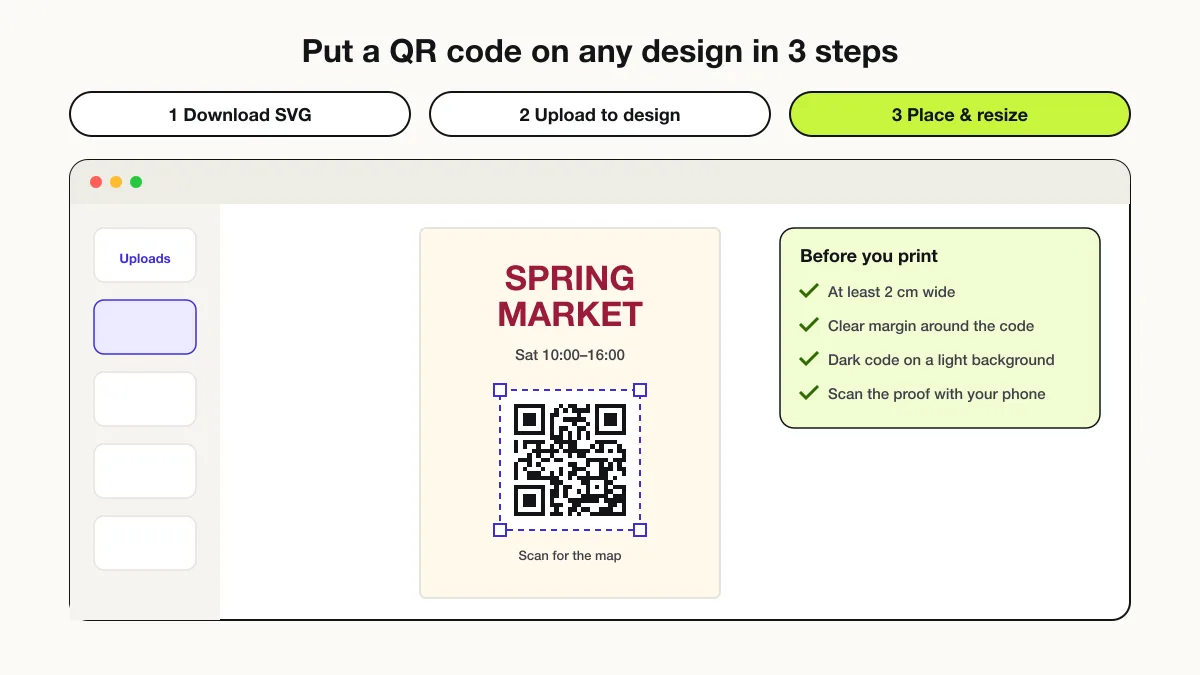
How do you make a QR code with Canva’s QR Code app?
Open the Apps panel, add the QR Code app, paste the URL and click Generate code. The 6 steps below work in the browser and the desktop app.
- Open or create a design in Canva.
- Click Apps in the left side panel.
- Search for “QR code” and select the QR Code app.
- Paste the full URL, including https://.
- Open Customize to set colours and margin if needed.
- Click Generate code, then drag and resize the code on the design.
What are the limits of Canva’s QR code generator?
Canva’s QR Code app encodes URLs only and offers no error-correction setting. The table compares the built-in app with importing a QR code SVG.
| Feature | Canva QR Code app | Imported QRJiffy SVG |
|---|---|---|
| Content types | URL | Link, WiFi, vCard, email, SMS, WhatsApp, event and more |
| Colours | Foreground and background | Any colour, editable in Canva |
| Error correction | Not adjustable | L, M, Q or H |
| Logo in the centre | No | Yes |
| Sharp at any size | Yes | Yes (vector) |
How do you add a WiFi or vCard QR code to Canva?
Generate the code as an SVG, then upload the SVG to Canva’s Uploads panel and drag it onto the design. The 4 steps:
- Create the code in a generator, for example the WiFi QR code generator for guest WiFi.
- Download the SVG file.
- In Canva, click Uploads → Upload files and choose the SVG.
- Drag the uploaded file onto the design and resize it from a corner handle to keep it square.
Canva keeps SVG uploads as vectors, so the code stays sharp in PDF Print exports.
How do you place a QR code on a Canva design so it scans?
Place the code on a plain light area, keep a 4-module white margin and size it at least 2 × 2 cm. Avoid photos, gradients and patterns behind the code. Never crop the code with a frame element. Add a short call to action next to it, such as “Scan for the menu”.
Which Canva export format is best for a QR code?
PDF Print is the best Canva export for printed QR codes because it keeps vectors sharp. PNG suits social media and websites. JPG adds compression artefacts around module edges and is the weakest choice. The how to print a QR code guide covers paper, DPI and size.
How do you test a Canva QR code before printing?
Scan the code on screen at 100% zoom, then scan one printed proof from the real distance. Test with both an iPhone and an Android phone. Confirm that the link opens on mobile data and that any Google Drive or Canva share link is set to public.
Where can you make an SVG QR code for Canva?
QRJiffy exports any QR code type as an SVG ready for Canva, free and with no watermark. Create a QR code now and upload it to your design.
Frequently asked questions
Does Canva have a free QR code generator?
Yes, Canva includes a free QR Code app in the editor’s Apps panel. It encodes a URL and places the code on the design.
Can I make a WiFi QR code in Canva?
No, Canva’s QR Code app encodes URLs only. Make the WiFi QR code in a dedicated generator, download it as SVG and upload it to Canva.
Do Canva QR codes expire?
No, Canva’s QR codes store the link itself, so they keep working as long as the linked page stays online.
Can I change the colour of a QR code in Canva?
Yes, the QR Code app has a Customize option for foreground and background colour. Imported SVG codes also take any colour through Canva’s colour picker.
Why is my Canva QR code not scanning?
Canva QR codes usually fail because they were resized too small, placed on a busy background or cropped into the quiet zone. Enlarge the code and place it on a plain light area.
Sources
- Point for determining the code area (quiet zone) — DENSO WAVE (QRcode.com)
- Point for setting the module size — DENSO WAVE (QRcode.com)